· 10 min read · Next.js · SEO · Core Web Vitals
Next.js SEO for an AI wedding platform: six fixes, in the order they mattered
Next.js SEO on an AI wedding-planning platform: headings first, then images, alt text, crawler files and JSON-LD, in the order the work paid off.
Updated 27 September 2026: restructured around the order of the work, added a checklist and three diagrams, and replaced a cover image whose alt text was a filename.
The Next.js SEO fix that mattered most on this project was not an image, a sitemap or a schema. It was the homepage having more than one <h1>. Every component had picked the heading tag that looked right on its own, and the assembled page was asking Google to guess what it was about.
The client is an AI-powered wedding-planning platform. It launched with good product thinking and a search presence that did not reflect it. That is a common outcome for React applications, because the framework makes it easy to build a page that renders beautifully and describes itself badly.
This is the Next.js SEO work I did on it, in the order the changes mattered. It is not a before-and-after scorecard. It is the order of the work and the reasoning behind each step, and where the post mentions thresholds, they are targets, not results.
Steal this: do it in order >
1. Headings. One<h1>per page,<h2>for sections,<h3>only for repeated cards.
2. Measure. Find your real LCP element before touching any image.
3. Images. WebP throughnext/image,quality={80}, explicit width and height, hero eager, everything below the fold lazy.
4. Alt text. Describe the image, include the intent, skip the keyword stuffing.
5. Crawler files. Generatesitemap.xmlfrom your data, not by hand. Keeprobots.tsandllms.txtdeliberate, in code.
6. JSON-LD. Make the entities explicit from the same data: Organization, then LocalBusiness and Place where they apply.
Who this is not for: anyone looking for a ranking trick. Everything here is ordinary, and the order is the point.
Why headings come before images
The tempting first move on an image-heavy site is to go straight at the images, because that is where the bytes are and where PageSpeed points.
I put headings ahead of images, for three reasons. The heading pass costs a morning. It requires no new dependencies. And it is the input everything else is interpreted against: a fast page with a muddled outline is a fast page the crawler still has to guess about.
The second reason to hold off on images is measurement. The LCP element is frequently not the image you assumed. Optimise the wrong asset and you get a satisfying PageSpeed graph and no change in the field data.
The cheapest SEO win costs a morning and no dependencies.
Heading hierarchy, because structure is the cheapest win
Component-driven development produces what I think of as heading soup. Every component author picks the tag that looks right in isolation, and the assembled page ends up with four <h1> elements and an <h3> nested under nothing.
Search engines use heading structure to work out what a page is about and which parts are subordinate. Get it wrong and you are asking the crawler to guess.
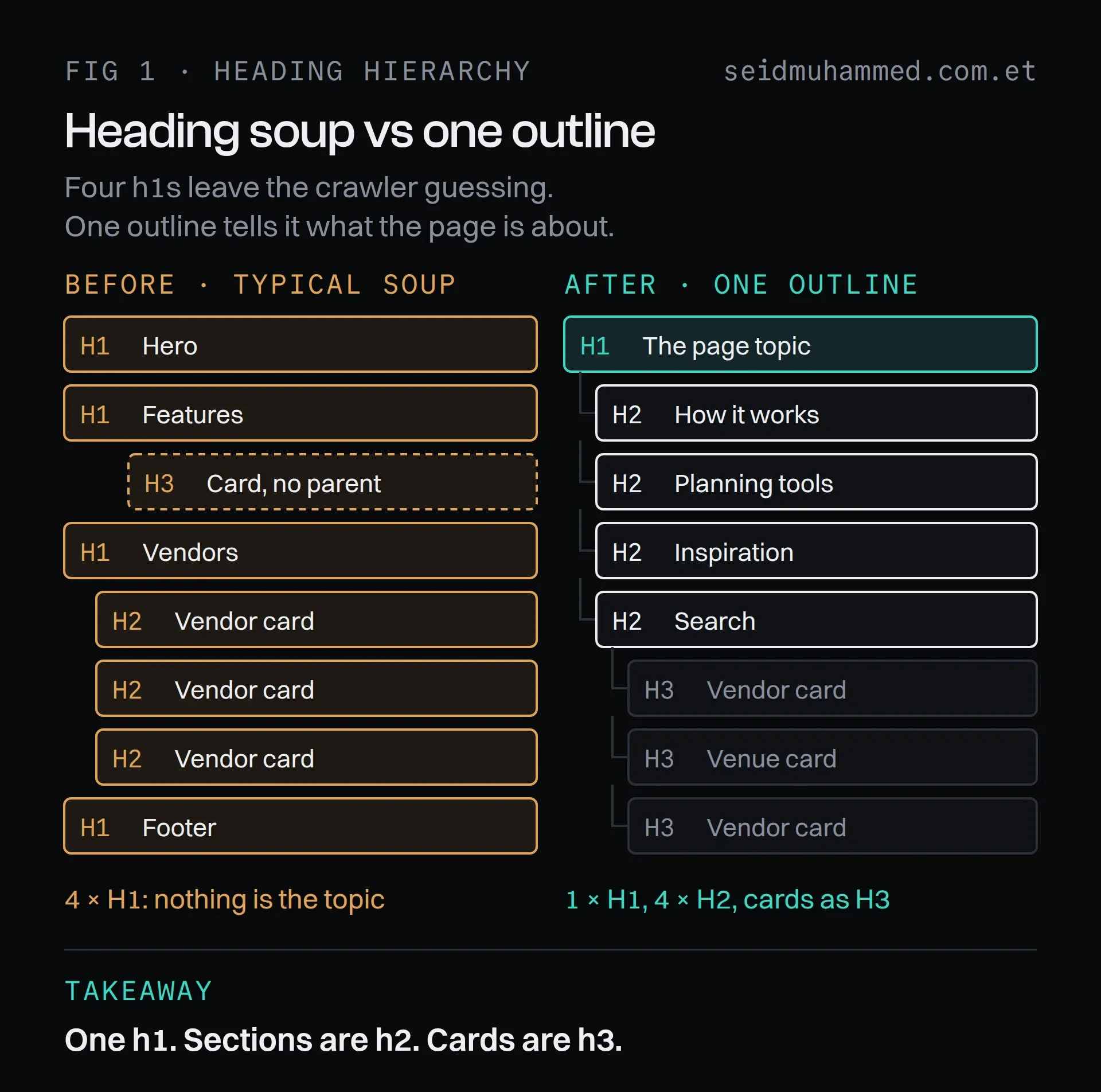
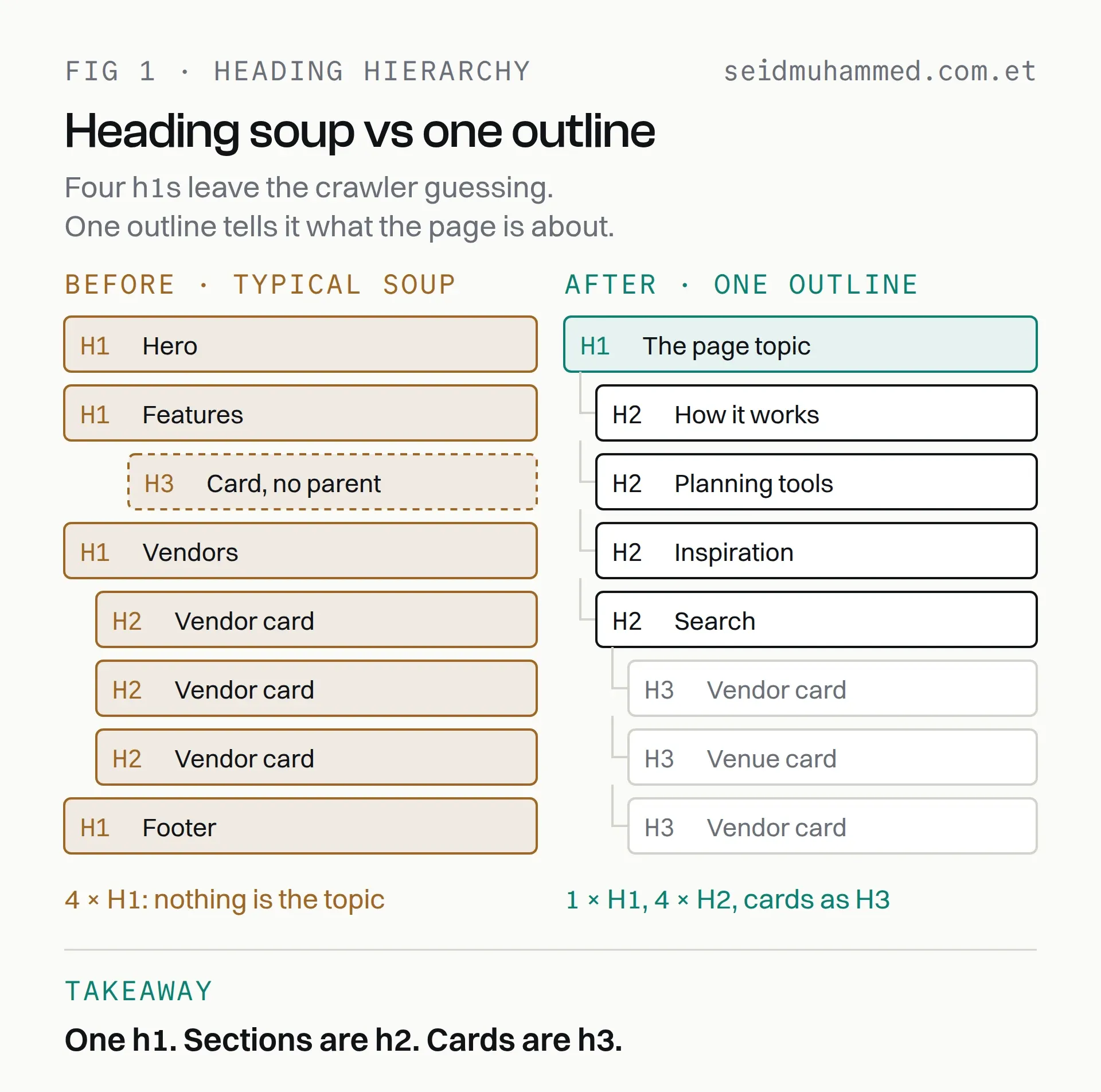
The fix removes tags rather than adding any. Only one h1 survives, and the cards stop competing with the sections.
The homepage had multiple <h1> tags. We consolidated to one:
Your AI-Powered Wedding Planner in Australia
Then organised beneath it: <h2> for the core capabilities, one per product area, and <h3> reserved for repeated items like individual vendor and venue cards.
Cards are the trap here. They look like headings, so they get marked up as headings, and a page with forty <h2> elements has effectively told the crawler that nothing is more important than anything else.
Forty <h2>s means nothing is important.
The portals got their own high-intent <h1>s rather than inheriting a generic one:
- Vendor portal: Find Trusted Wedding Vendors in Australia
- Venue portal: Discover Wedding Venues Across Australia
This is the least glamorous work in the list and it moved the needle before anything else did. It is also free.
Core Web Vitals, and where the time actually was
The targets were the standard thresholds, measured through PageSpeed Insights: LCP under 2.5s, CLS under 0.1, and interaction latency under 100ms.
On an image-heavy site, LCP is almost always an image problem, and it was here. Three changes, in order of impact.
Format. Moving off JPEG to WebP through next/image. Compression at equivalent perceived quality is substantially better, and it is a configuration change rather than a rebuild.
Quality tuning. Setting quality={80} rather than leaving the default. Above roughly 80 you are spending bytes on differences that survive neither a phone screen nor a JPEG-trained eye. Below it, gradients start to band and the hero image looks cheap. It is worth actually looking at your own images at a few values instead of copying a number from a blog post, including this one.
Lazy loading everything below the fold, and equally importantly not lazy loading the hero. A lazily loaded LCP element is a self-inflicted regression, and it is an easy mistake to make when you apply the optimisation uniformly.
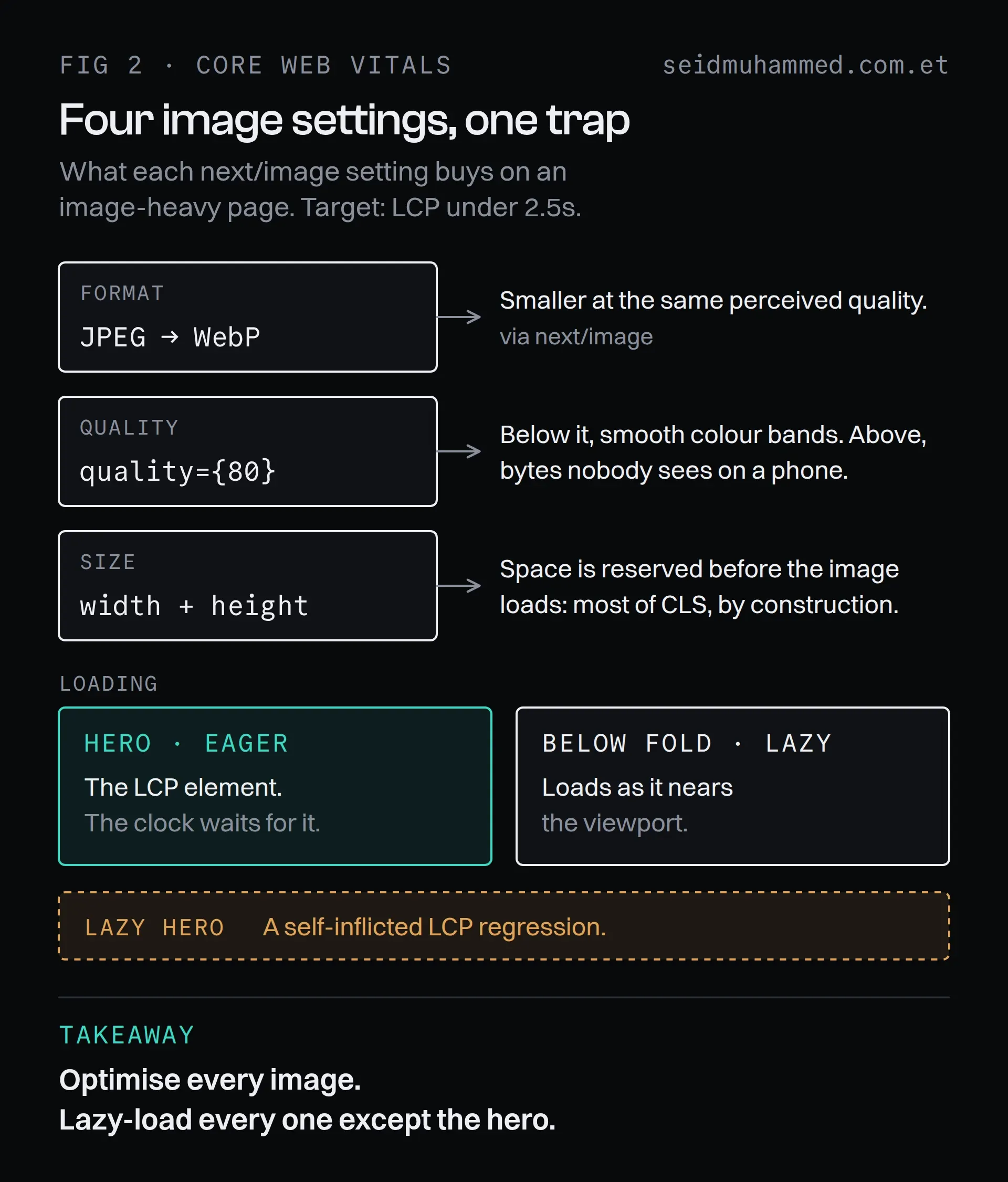
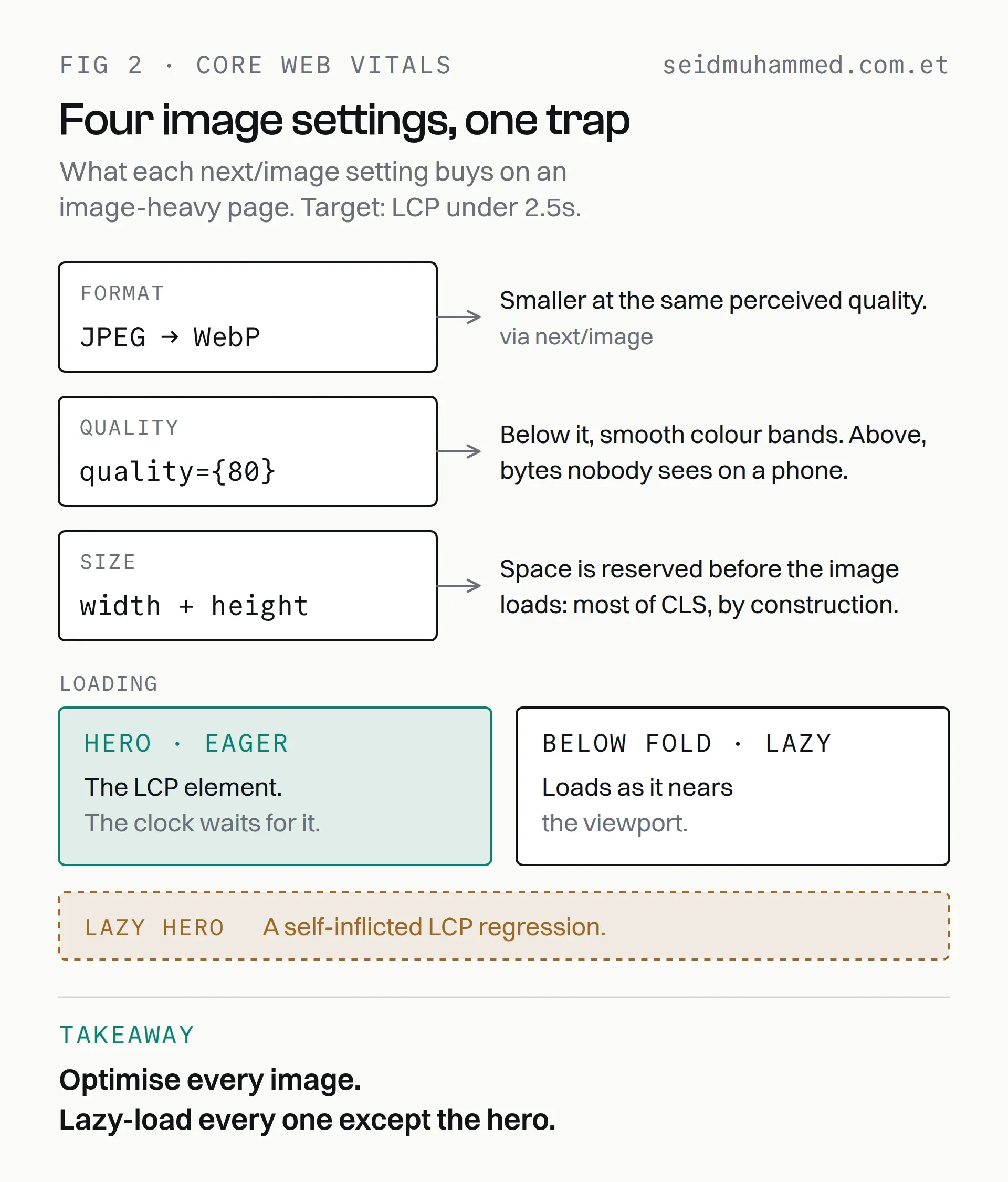
Four settings, one of them a thing you must not do. The hero is the image the LCP clock is waiting for.
The subtler win was layout shift. next/image requires explicit dimensions, and honouring that requirement, rather than reaching for fill with a loosely sized parent, is most of CLS solved by construction.
Lazy-loading your hero image is a self-inflicted regression.
Image alt text as an indexing surface
Fast images that nobody can identify are still invisible. On a visual platform, image search is a real acquisition channel, and alt text is how you enter it.
The rule we applied: describe the image, include the intent, skip the keyword stuffing.
- Hero: Bride and groom planning with AI wedding tool [brand]
- Vendor portal: Sydney wedding photographer — [brand] vendor
- Venue portal: Beach wedding venue — Gold Coast
Each one is a sentence a person would write, containing a location and a category because that is what the image genuinely shows. Alt text is also an accessibility requirement, so this is one of the rare cases where the SEO incentive and the right thing point the same direction.
It is also the easiest rule to break on your own site. Until this update, the cover image on this very post had a filename for its alt text. That one is fixed now.
Telling crawlers what to crawl
A dynamic sitemap.xml. The platform adds vendors and venues continuously, and a hand-maintained sitemap is stale the day after you write it. Generating it from the same data source that renders the pages means new listings are discoverable as soon as they exist.
A robots.ts that is deliberate. Not a copy-pasted disallow list, but an explicit statement of which surfaces are for discovery and which are application internals. Crawl budget is finite, and spending it on authenticated portal routes is spending it on nothing.
An llms.txt. This one is speculative and I want to be honest about that: it is not a ratified standard and no crawler is obliged to read it. But for an AI product, the cost of publishing a plain-text summary of what the platform does is close to zero. The failure mode it guards against, a language model confidently describing your product wrongly, is expensive and hard to correct after the fact. (How those models learn what they say is its own subject; I covered the training side in a separate post.) I would call it cheap insurance rather than an optimisation.
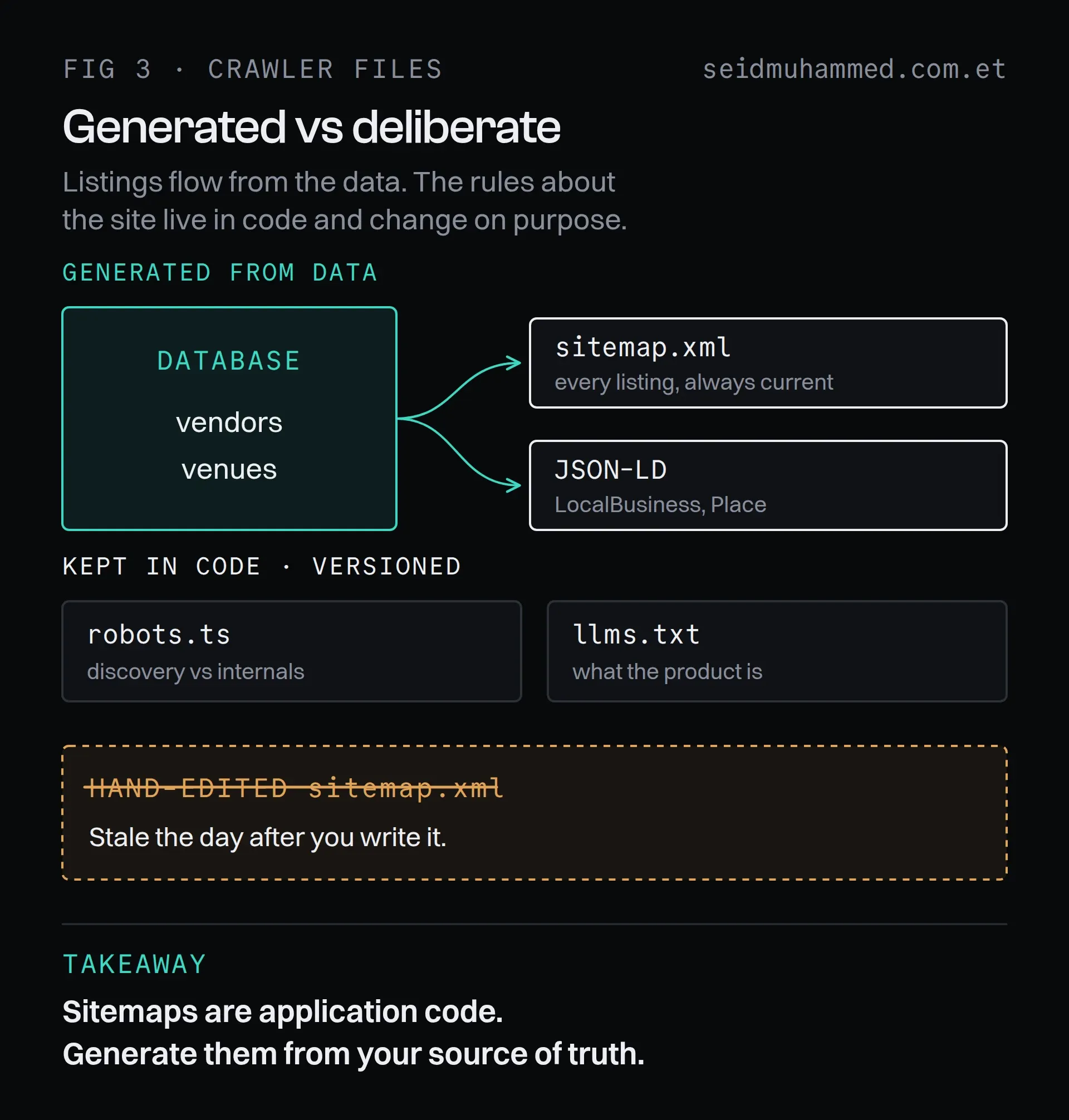
A new venue appears in the sitemap and its JSON-LD the moment it exists in the database. The files that describe the site rather than its listings change only when someone decides they should.
llms.txt is insurance, not optimisation.
Structured data
JSON-LD to make the entities explicit rather than inferred:
- Organization schema, establishing the brand as a formal entity with a canonical name, URL and profiles
- LocalBusiness and Place schema on vendor and venue pages, which is what makes them eligible for localised Australian results
Structured data does not improve rankings directly. What it does is make you eligible for rich results, and it removes ambiguity about what a page represents. On a marketplace where every listing is a real business in a real city, that ambiguity is worth removing.
What I would tell someone starting this
Do the heading pass first. It costs a morning, requires no new dependencies, and it is the input everything else is interpreted against.
Then measure before optimising images, because the LCP element is frequently not the image you assumed, and optimising the wrong asset produces a satisfying PageSpeed graph and no change in the field data.
And treat the crawler-facing files (sitemap, robots, structured data) as application code with a source of truth, not as static files someone updates when they remember. The version that is generated from your data is the version that stays true.
Sitemaps are application code.
FAQ
What is the first Next.js SEO fix to make?
Fix the heading hierarchy: one <h1> per page, <h2> for sections, <h3> only for repeated items like cards. It costs a morning, needs no dependencies, and everything else a crawler reads is interpreted against it.
Should you lazy-load the hero image in Next.js?
No. Lazy-load everything below the fold and load the hero eagerly. The hero is usually the LCP element, and lazy-loading it delays the exact paint the metric measures.
What quality setting should next/image use?
quality={80} is a sensible starting point. Above roughly 80 you pay bytes for differences nobody sees on a phone; below it, gradients start to band. Check your own images at a few values rather than copying a number.
Is llms.txt worth adding to a Next.js site?
For an AI product, yes, as cheap insurance. It is not a ratified standard and no crawler is obliged to read it, but it costs almost nothing and guards against a model describing your product wrongly.
Does structured data improve rankings?
Not directly. JSON-LD makes a page eligible for rich results and removes ambiguity about what it represents, which matters on a marketplace where every listing is a real business in a real place.
How should a Next.js marketplace generate its sitemap?
From the same data source that renders the pages. A hand-maintained sitemap is stale the day after you write it; a generated one lists new vendors and venues as soon as they exist.
Do the heading pass this week
None of this is clever. It is the difference between an application that renders correctly and an application that also explains itself, and on a marketplace the second one is the product.
Open your homepage this week, list its headings in order, and count the <h1>s. If the answer is more than one, you have found your cheapest SEO win.
If you'd rather have this done on your Next.js app than work through it from a blog post, get in touch. The rest of my work is on my projects page.