· 20 min read · AI pipelines · Remotion · AWS Lambda · TypeScript
Engineering PlanReel: a 40-page PDF to a narrated video, rendered on 94 Lambdas
How PlanReel turns a Medicare plan PDF into a narrated video in the agent's own voice, and how moving the render from one small box to 94 Lambdas made it 23 seconds and $0.028.
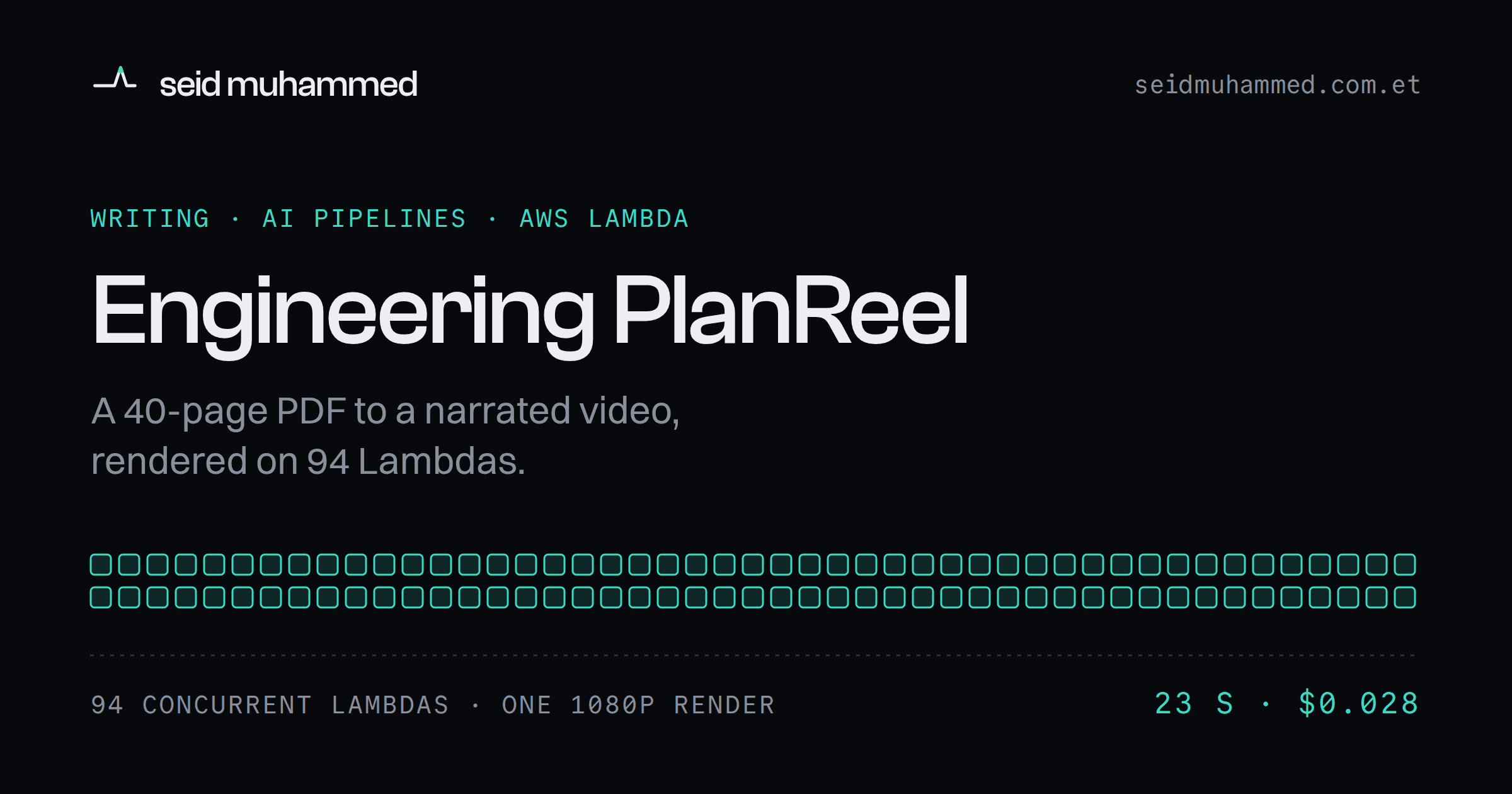
Ninety-four Lambda functions started at once, rendered two and a half minutes of 1080p video in 23 seconds, and billed $0.028. Before that, rendering ran on one small ARM box with two vCPUs, two frames at a time, and a three-to-four minute video is roughly 7,000 frames. On that box, even loading fonts could blow Remotion's 28-second render timeout.
That render is the last step of PlanReel, a PDF to narrated video pipeline for Medicare insurance agents. It reads a plan's benefit documents, writes a script, speaks it in the agent's own cloned voice, and renders a personalised video built from that plan's real numbers.
This is how it was built, including the parts that went wrong.
Steal this >
- Derive your renderer, your forms and your model's output schema from one Zod schema, so a renamed field breaks the build instead of a render.
- Test the whole JSON Schema you send a model for forbidden keywords, not just the properties you remembered to check.
- When a single request is bigger than your tokens-per-minute limit, chunk the input. Retrying will never make it fit.
- Content-address anything you pay for per call: hash the text you actually send plus the settings that change the output.
- Once a status is terminal, stop polling and freeze the presigned URLs already in your render tree.
Who this is not for: anyone who needs one generic explainer video. A template tool is faster. This is for engineers building document-to-media pipelines where a wrong number is a compliance problem, not a typo.
The problem
Every autumn, Medicare insurance agents hit the same wall. Their clients receive two documents: a Summary of Benefits, covering what the plan pays for next year, and an Annual Notice of Change, covering what moved since last year. Both are dense, both are legally precise, and almost nobody reads them.
So agents explain them instead. One phone call at a time, hundreds of times a season, repeating the same sentences about premiums and copays and drug tiers to people who deserve a better answer than a 40-page PDF.
The obvious fix, "make a video", is a trap. A generic explainer is useless, because benefits are plan-specific, and a wrong number in Medicare-adjacent content isn't a typo. It's a compliance problem. What agents need is a personalised video per plan, in their own voice, built from that plan's real numbers, produced in minutes.
What it does
Upload a plan PDF. A few minutes later an editable slide deck appears: real figures pulled from the document, laid out across eleven templates, with word-for-word narration written for each slide. Edit anything by clicking it directly on the slide. Generate the voiceover in your own cloned voice. Render a 1080p MP4 with burned-in captions and an SRT sidecar.
The workflow is four steps, deliberately shaped like a deck tool rather than a wizard, because the people using it already know PowerPoint.
Step | What happens |
|---|---|
1 · Design | Theme, fonts, branding, and how the video ends |
2 · Slide details | Click any text on the slide and edit it in place |
3 · Voiceover | Generate audio for the whole deck, or just the slides you tick |
4 · Render | Preview, captions, approve, render |
Everything is human-in-the-loop by design. The model drafts; the agent approves. Nothing reaches a client without a person having read every word.
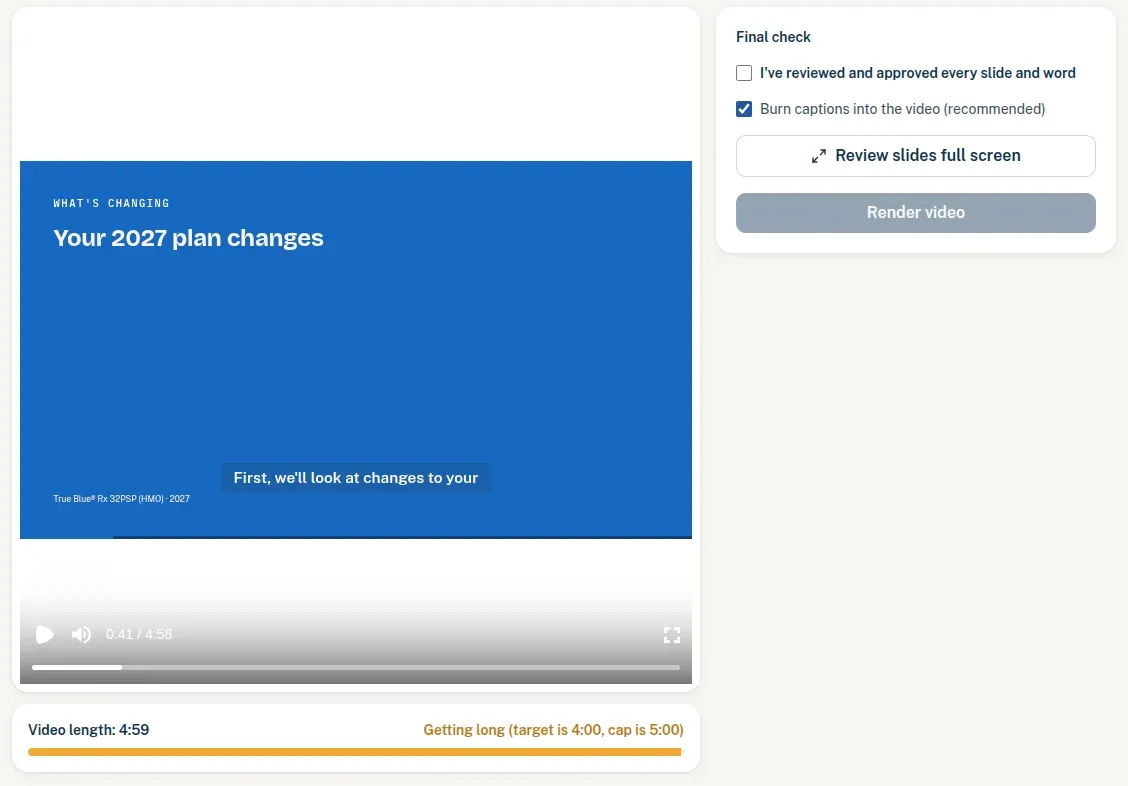
The render button stays disabled until a person ticks the approval box. The approval is a gate in the product, not a line in the terms of service.
The screenshots in this post come from a different, longer video than the measured render below: 4:59 and 32 MB.
Architecture
A pnpm and Turborepo monorepo: five packages, roughly 14,000 lines of TypeScript.
apps/
  web       Next.js 15 — upload, editor, settings, auth
  worker    BullMQ consumer — extract, script, speak, render
packages/
  core      Zod schemas: the single source of truth for every boundary
  db        Drizzle and Postgres
  video     Remotion compositions — 11 slide templates
The pipeline is four jobs on one queue, each idempotent, each failing into a human-readable error rather than a stack trace.
  PDF ──▶ extract ──▶ generate-script ──▶ synthesize-slide ──▶ render ──▶ MP4 + SRT
           │                                    │                 │
      chunked,                            per slide,         local or
   rate-limit aware                    content-hashed          Lambda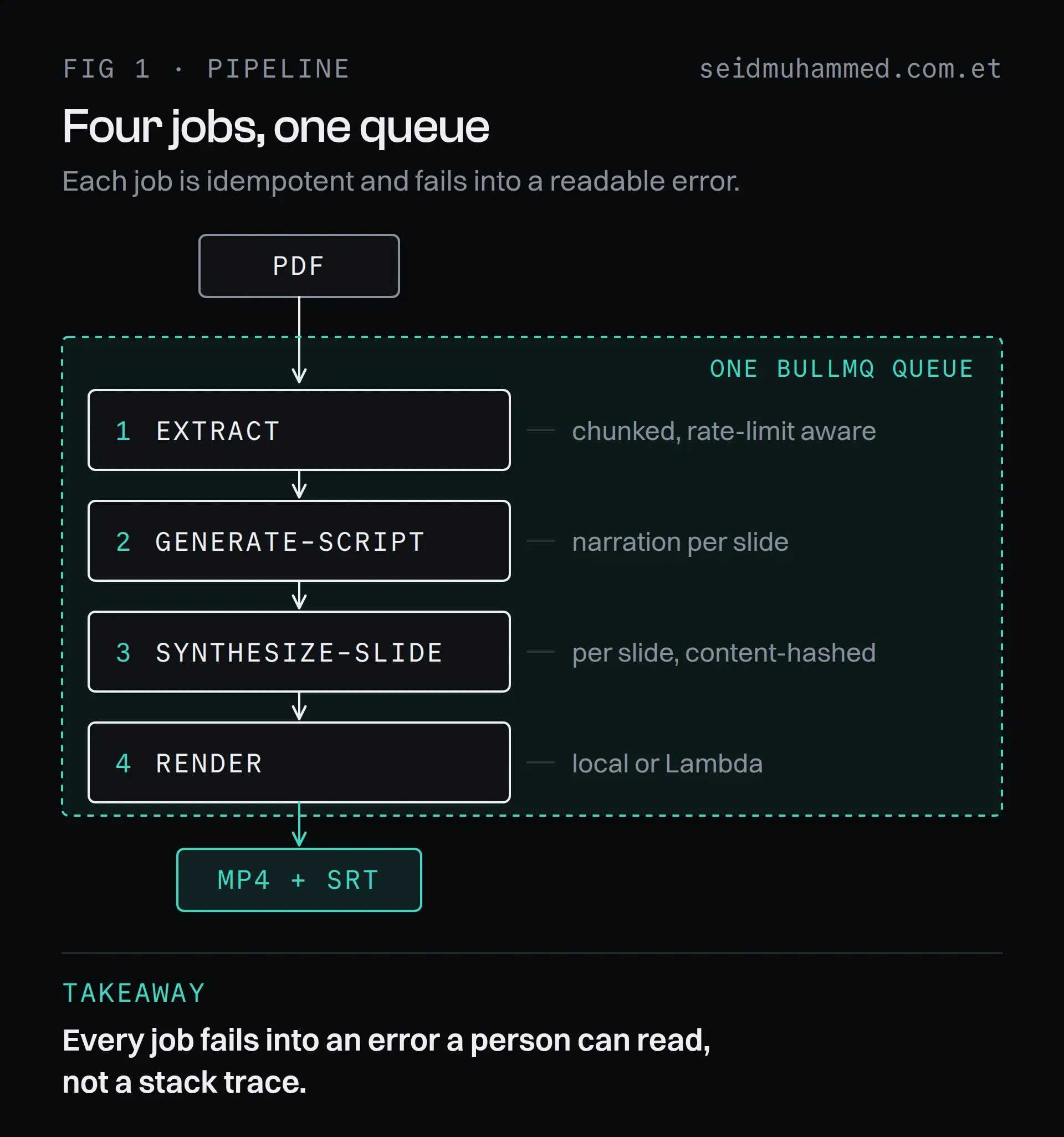
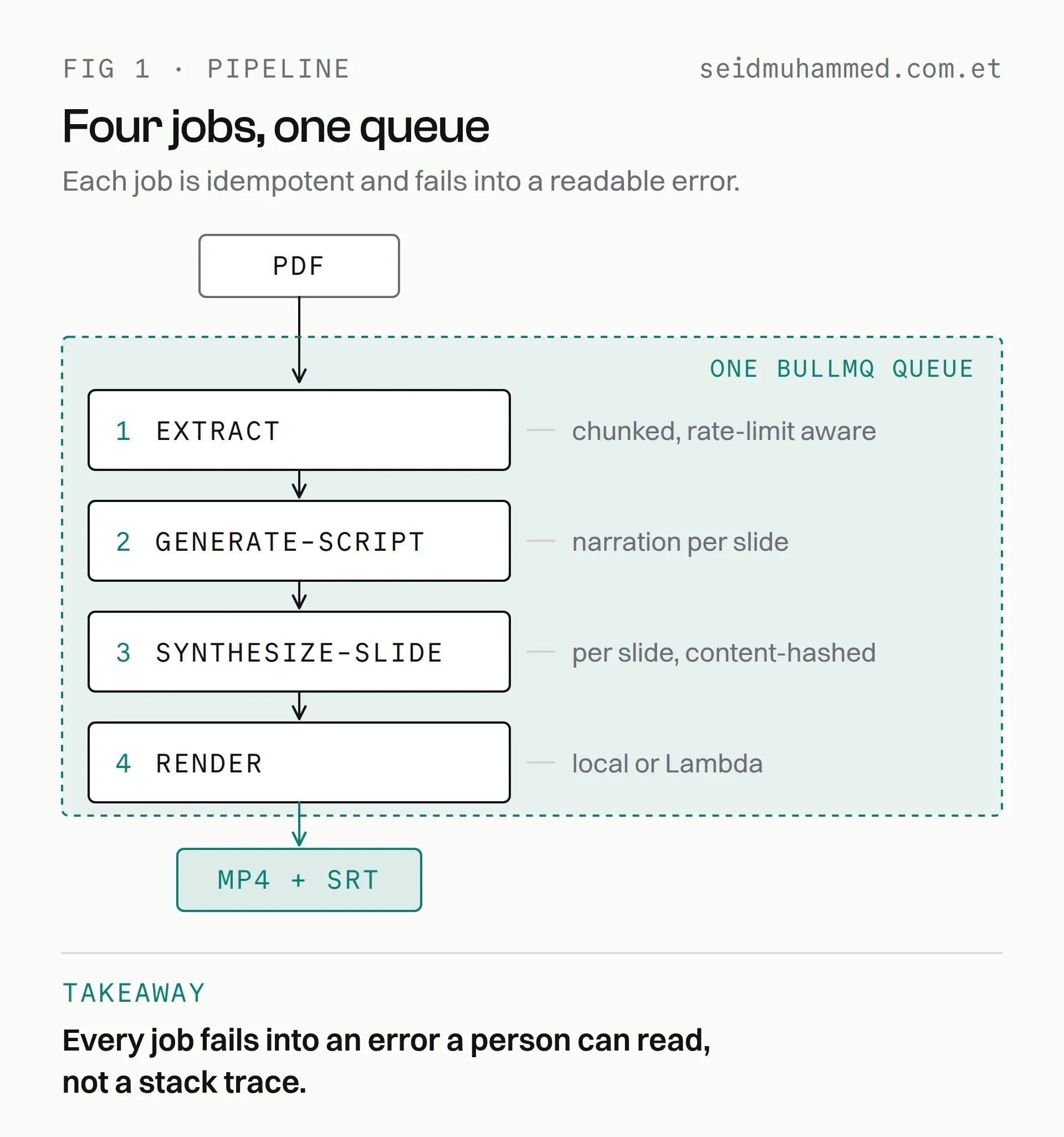
Idempotent is what makes a retry cheap: re-running a slide whose spoken text hasn't changed bills nothing, because its hash still matches.
The single most important decision: packages/core owns every schema. The Remotion components, the editor forms and the model's output schema all derive from the same Zod definitions. When a slide's shape changes, all three move together or the build fails. The "renderer expects a different field name" class of bug doesn't exist here, because it isn't expressible.
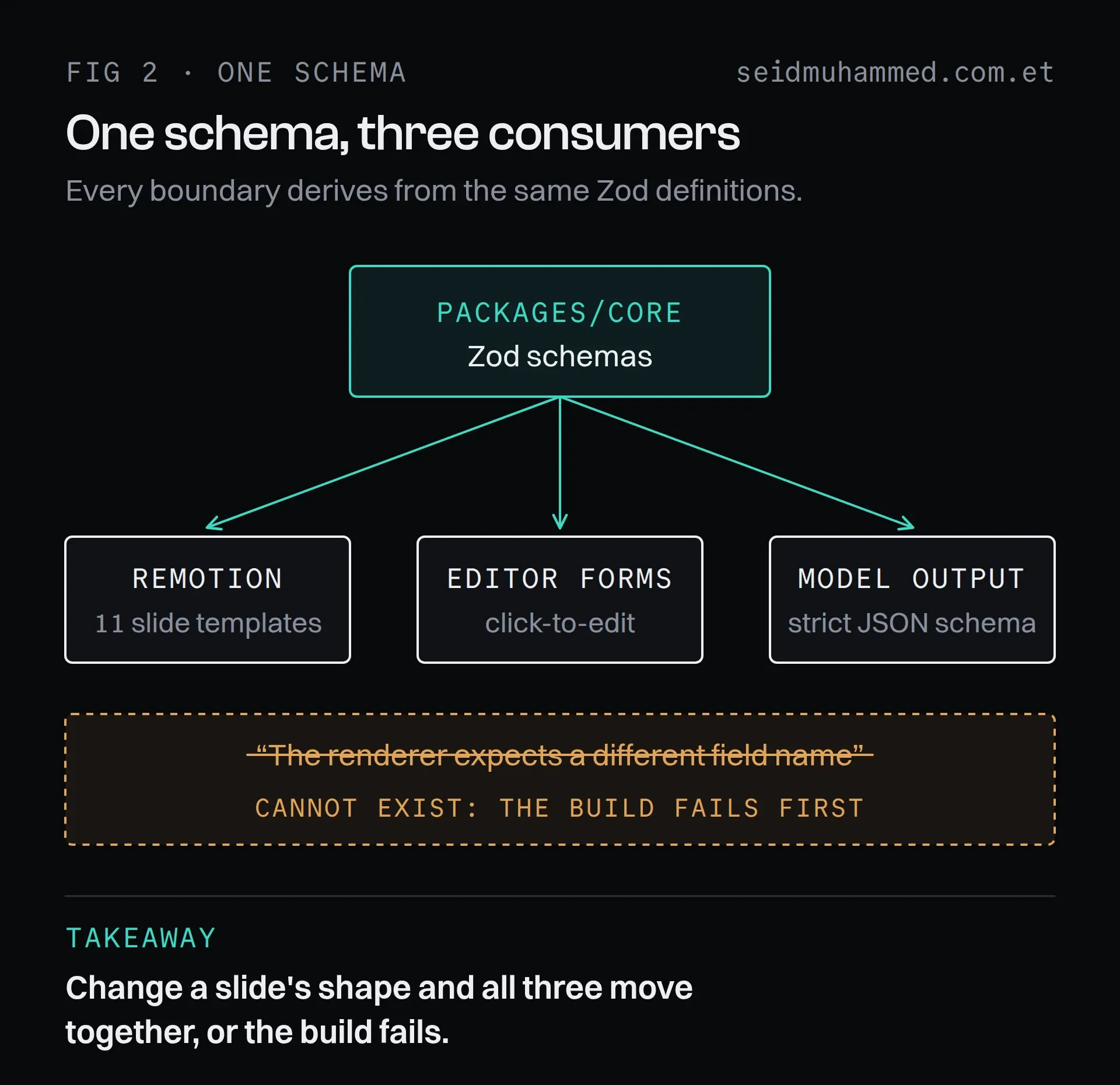
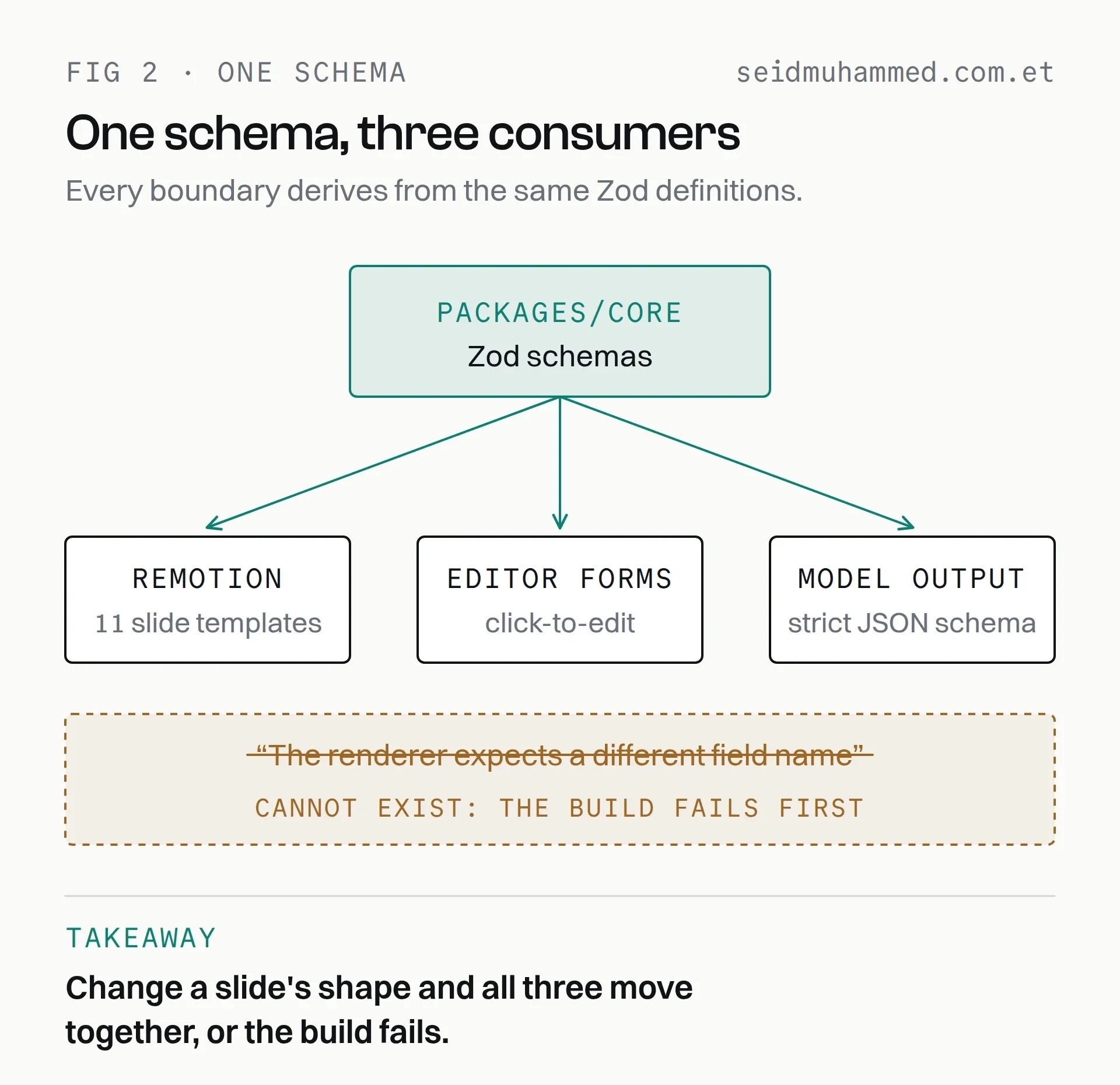
A whole class of bug isn't caught here. It can't be written in the first place.
Rendering, and the 94-machine trick
The render numbers come first.
Preview and render are the same component
The editor's preview and the final render are literally the same React component. PlanReelVideo runs in @remotion/player in the browser and in the Remotion renderer on the server. There is no second preview implementation to drift out of sync. What you see is what renders, structurally.
The single-box ceiling
Rendering started on the same small ARM instance that ran everything else and became the bottleneck immediately. A three-to-four minute video at 1080p is around 7,000 frames, each one a headless-Chrome screenshot. Two vCPUs is two frames at a time.
The first round was ordinary optimisation, plus one genuinely misleading bug:
undefineddelayRender() timed out after 28000msThe default 28-second budget was being blown by font loading on a memory-pressured box. The render wasn't broken; it was slow in a place with a short timeout. Raising it to 120 seconds fixed the symptom, but the more valuable change was making the failure legible. The bundler now probes for a known font file and throws a named error if it's missing, because a missing asset and a slow machine previously produced identical, opaque timeouts.
const probe = join(serveUrl, 'public', 'fonts', 'BricolageGrotesque-700.woff2')
if (!existsSync(probe)) {
  throw new Error(`Remotion bundle is missing static assets: ${probe} not found…`)
}
Alongside that: x264Preset: 'veryfast' and jpegQuality: 80. The design is flat brand colour and type, so it compresses trivially and the slower presets bought nothing visible.
That helped. It didn't change the physics.
Tuning one box moves you along the same line. It doesn't get you off it.
Remotion Lambda
The real fix was to stop thinking about one machine. Remotion Lambda splits the composition into chunks, renders them across hundreds of concurrent functions, and stitches the result. The worker treats it as a mode rather than a rewrite: same composition, same input props, one branch.
if (env().RENDER_MODE === 'lambda') {
  assertLambdaConfigured()
  videoBuffer = await renderOnLambda({ inputProps, onProgress })
} else {
  const serveUrl = await getBundle()
  await renderVariant({ serveUrl, inputProps, outPath, onProgress })
  videoBuffer = await readFile(outPath)
}
Measured on a real render, not estimated:
Metric | Result |
|---|---|
Concurrent Lambdas | 94 |
Wall-clock time | 23 seconds |
Cost | $0.028 |
Output | 15 MB, 1080p H.264 + AAC |
Two and a half minutes of finished video for under three cents, in less time than it takes to read this paragraph. And no idle cost: no videos, no bill.
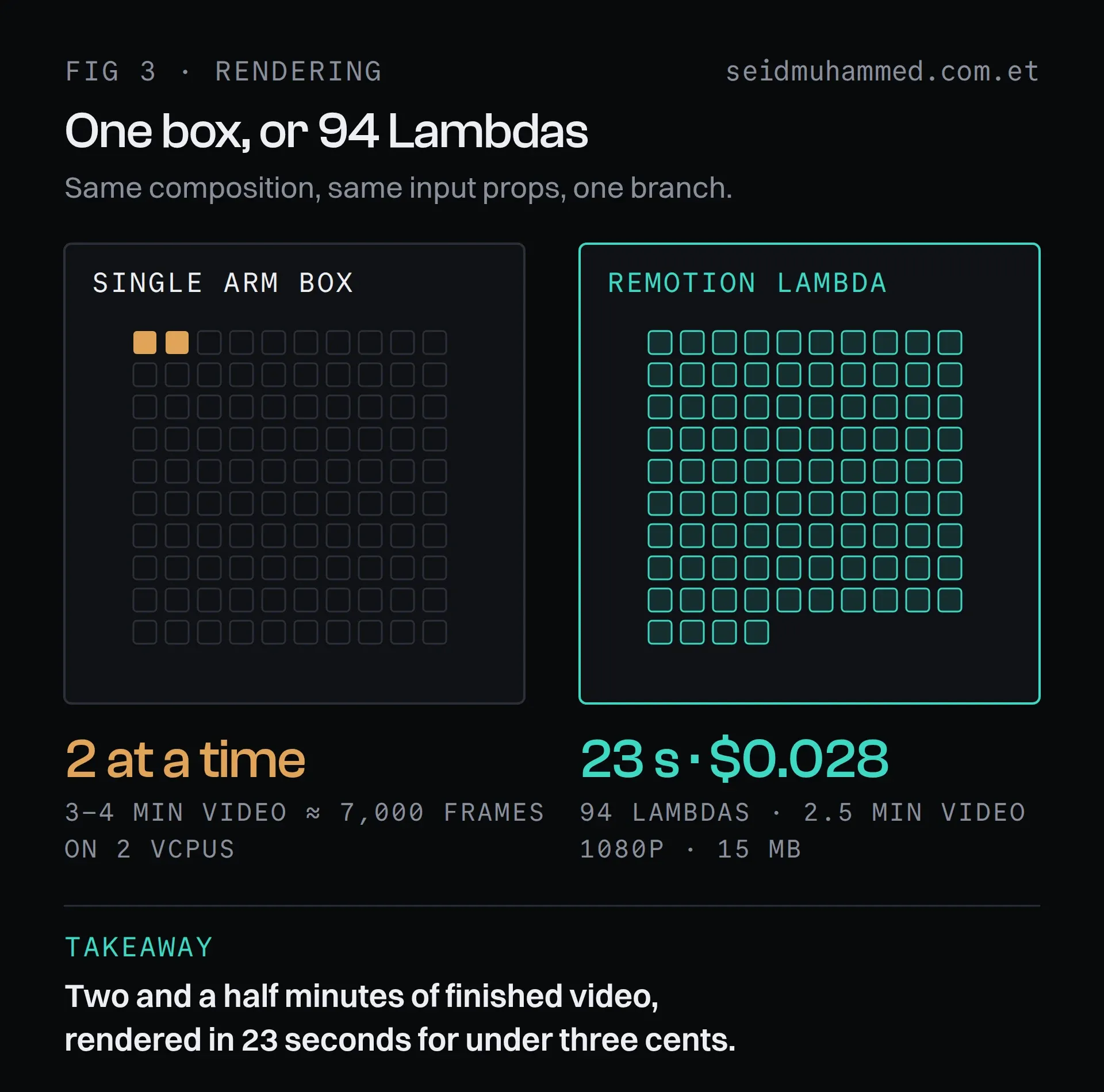
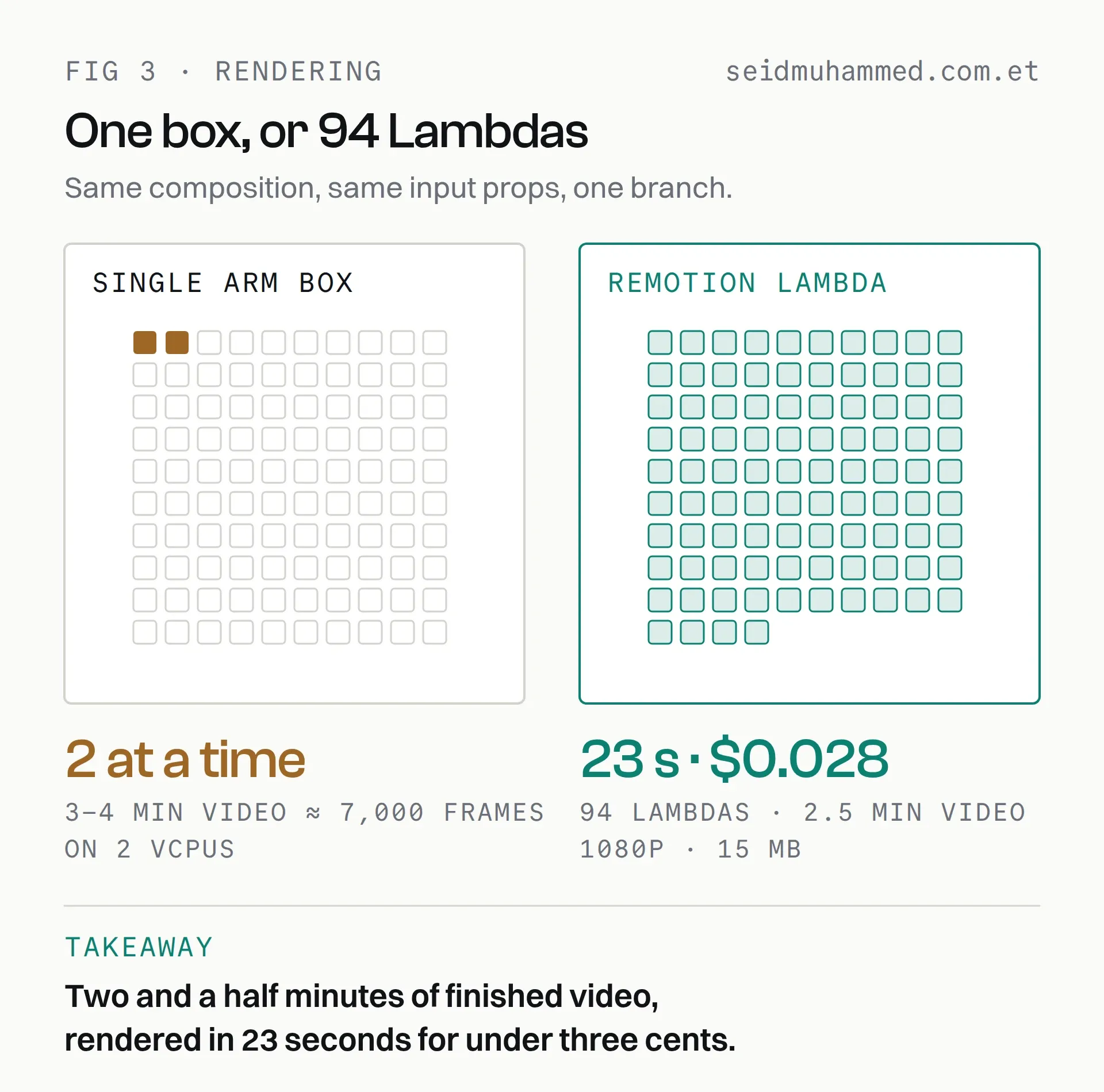
No videos, no bill: the grid on the right costs nothing while it sits idle.
Three things worth knowing if you follow this path:
- Version pinning is absolute. Every
@remotion/*package, the deployed Lambda function and the deployed site must be byte-identical versions. A mismatch fails in confusing ways. - Concurrency buys speed, not savings. You pay for GB-seconds, so 200-at-once and 50-at-once cost about the same. One just finishes sooner.
- The site is a deployment artefact. Change a slide component and you must redeploy the serve URL, or Lambda renders silently keep using the old design.
The runtime deprecation email
Months in, AWS sent a notice: the Node.js 20 Lambda runtime had reached end of support. Nothing was broken, and nothing would break for another year. But security patches had stopped.
The fix was mechanical, and worth doing immediately rather than at the deadline: upgrade every Remotion package in lockstep (4.0.362 → 4.0.520), redeploy the function (now on Node.js 24, two generations forward), redeploy the site on the matching version, cut over, delete the old function.
Under an hour, including a verification render.
Deferred maintenance is a loan with a variable interest rate.
Reading the document
Structured extraction, not scraping
The extractor sends the PDF straight to the model with a strict JSON schema generated from Zod:
const extractionJsonSchema = toOpenAIJsonSchema(extractedPlanDataSchema, 'plan_extraction')Money is never a float. Every cost is an integer number of cents alongside a displayAs string carrying exactly what the document printed:
{ label: 'Specialist visit', displayAs: '$40 copay', amountCents: 4000 }That distinction matters more than it looks. displayAs is what appears on screen, verbatim from the source, so it can be audited against the PDF line by line. amountCents drives the count-up animation and nothing else. Costs with no single number, like "20% coinsurance" or "$425/day, days 1–5", carry amountCents: null and simply don't animate. The model is never asked to normalise a benefit into a number it might get wrong.
Structured output, not a fine-tuned model, is doing the work here: the schema constrains every answer, and the printed text is kept for audit. More on that trade in training, fine-tuning and RAG.
The schema that was valid but rejected
The first production extraction failed with:
undefined400 Invalid schema: 'oneOf' is not permittedZod's z.toJSONSchema() emits oneOf for discriminated unions. OpenAI's strict mode requires anyOf. It also rejects minimum, maxItems, minLength, const and about twenty other perfectly legal JSON Schema keywords.
The fix was a sanitiser that rewrites the emitted schema: oneOf becomes anyOf, const becomes a single-value enum, and numeric and length constraints are demoted into the field's description so the model still sees the intent.
The instructive part is why the tests missed it. They asserted that required and additionalProperties were set correctly: the things I had thought about. They never asserted the absence of things I hadn't. The replacement walks the entire emitted tree and fails on any of about 24 forbidden keywords.
Test the shape of the whole output, not just the parts you remembered.
The document that was too big to read
Then a 32-page plan failed differently:
undefined429 Rate limit reached: Limit 30000 TPM, Requested 34983A single request exceeded the account's entire per-minute token allowance. Waiting cannot fix that. The request will never fit, no matter how long you wait, which makes it an architecture problem wearing an error message's clothes.
The solution splits the PDF into page ranges with pdf-lib, extracts each independently and merges. Twelve pages per call lands around 18k tokens, comfortably inside a 30k window:
const chunks = await chunkPdf(pdfBuffer, env().EXTRACT_MAX_PAGES_PER_CALL) // default 12
for (const chunk of chunks) {
  const r = await extractChunkAdaptive(chunk, ctx, pdfBuffer)
  parts.push(...r.parts)
}
return mergeExtractions(parts)
Three details make it robust rather than merely working:
- Chunks run sequentially, on purpose. They share one tokens-per-minute window, so parallelising them would recreate the exact failure being fixed.
- Adaptive halving. If a chunk still trips request-too-large, it splits in half and retries recursively. Dense pages don't require a config change.
- Merge semantics are explicit.
mergeExtractionstakes the earliest high-confidence value for scalars, deduplicates benefit rows, and merges drug tiers by tier number and pharmacy channel. Page ranges stay absolute, so a benefit found on page 24 reports page 24, not "page 2 of chunk 3".
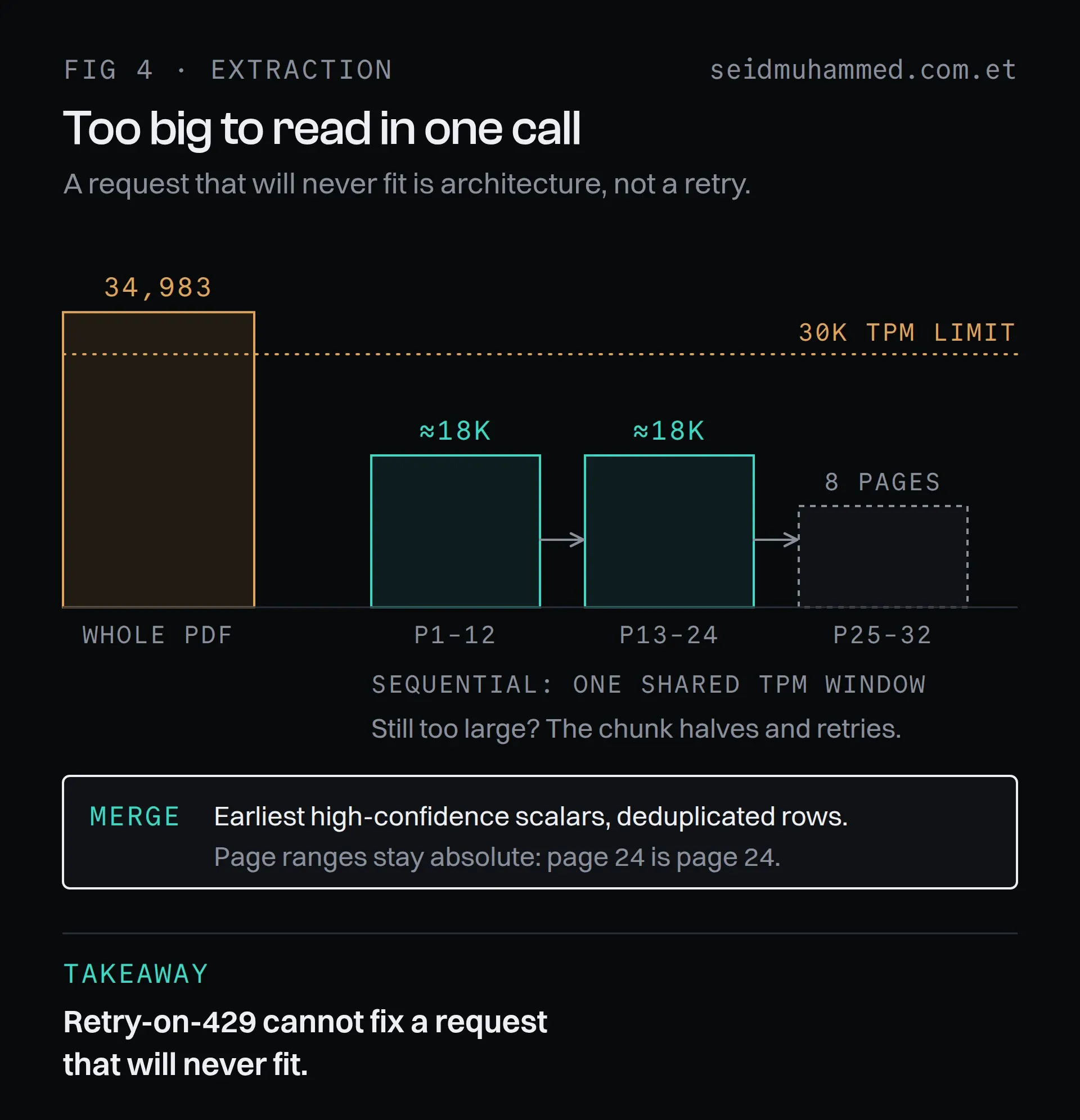
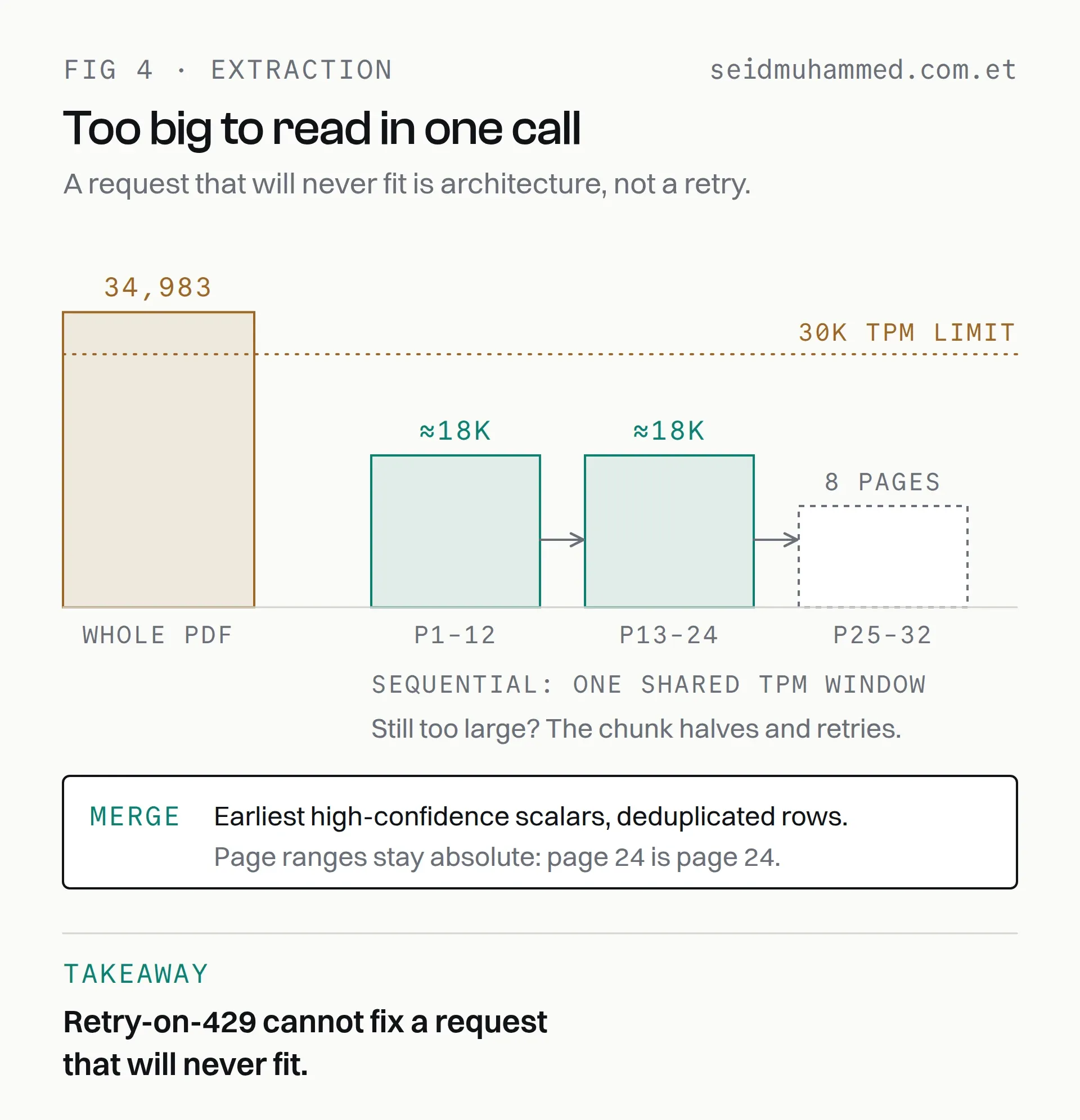
The last chunk is only eight pages: chunks are cut by page count, and page numbers stay absolute through the merge.
Every chunk prompt states its own page range and forbids the model from inferring anything outside the excerpt it can see.
The acceptance bar was a real corpus: 20 Summary of Benefits documents from 8 carriers, 9 to 50 pages each. Not fixtures. The actual mess, including one that is pure scanned images and several whose filenames disagree with their contents.
Retry-on-429 cannot fix a request that will never fit.
Writing the script
Script generation turns reviewed plan data into ordered slide segments with narration. The prompt is uncompromising about four things:
- Eighth-grade reading level. Second person. No jargon without an immediate plain-English gloss.
- Never an exclamation point. No hype. This is Medicare-adjacent content.
- Every number on screen must be spoken. Not a style rule: it drives the animation.
- Nothing may be invented. Every figure comes from the extracted data or it doesn't appear.
One requirement arrived from a real user and reshaped the whole prompt: "I need to make sure that it does not say call me." Different plans need different endings: a compliance review notice, an invitation to a group meeting, or simply "you don't need to do anything."
So endings became data. Closings are reusable objects with an on-screen headline and a spoken narration, chosen per video, handed to the model and used verbatim:
- THE CLOSING IS PROVIDED, NOT INVENTED. Put its headline in the outro slide's
  callToAction and its narration in the outro slide's narration, both VERBATIM.
- NEVER tell the viewer to call, phone, or ring the agent — not on the outro,
  not in a checklist item, not anywhere.
The phrase still kept reappearing. The cause turned out to be the schema description the model reads: the field's doc comment literally said e.g. "Call me with questions." No amount of system-prompt discipline was going to beat an example sitting in the schema.
The model reads your schema descriptions as instructions. Audit them like prompts.
The same rule reaches past the video. The ready screen hands the agent an email blurb for their clients, and, as the ready screen itself explains, it leaves the phone number out on purpose.
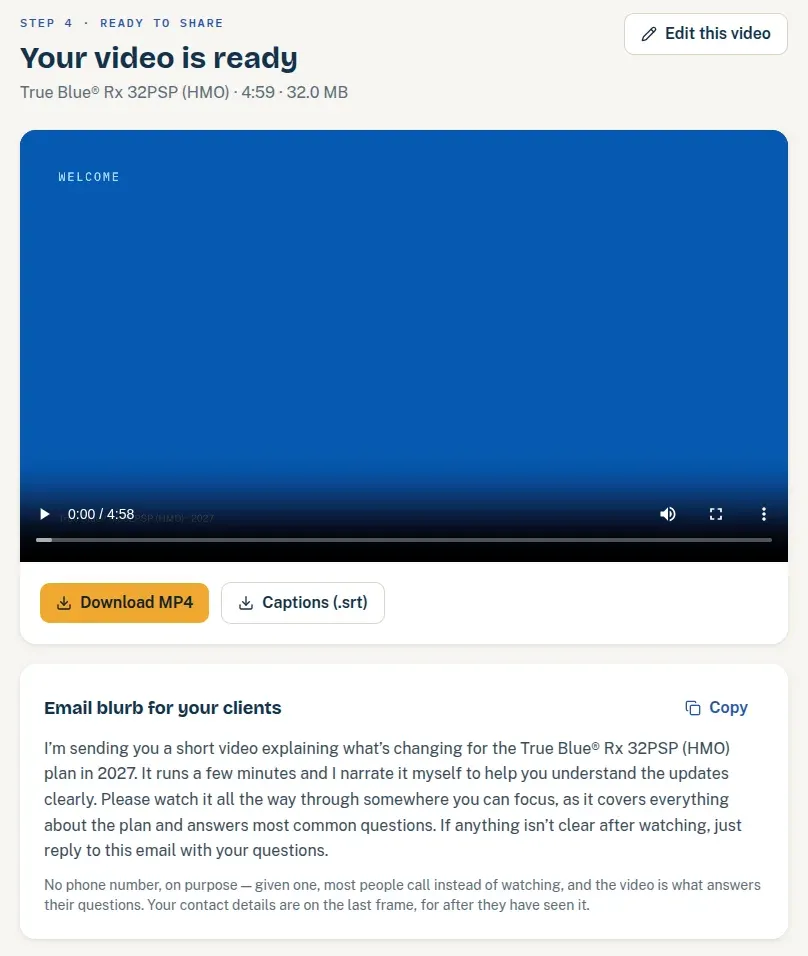
In the app's own words: given a phone number, most people call instead of watching. The contact details sit on the last frame, for after they've seen it.
The voice
Why timestamps change everything
Narration is synthesised per slide through ElevenLabs in the agent's cloned voice. The critical choice is the endpoint: /with-timestamps, which returns not just audio but character-level alignment, the start and end time of every character spoken.
That alignment is the backbone of three separate features.
Captions come straight from it: split on word boundaries at 42 characters, broken at sentence-final punctuation, emitted both as a burned-in layer and an .srt sidecar.
The Ledger Reveal, the signature motion of the product, is built from it too. When the narrator says "forty dollars", the number counts up on screen at that exact frame:
export function spokenTriggerFrame(alignment, narrationSubstring, fps = 30) {
  const hit = findSpokenTime(alignment, narrationSubstring)
  return hit === null ? null : timestampToFrame(hit.startSeconds, fps)
}
The script generator supplies a spokenHint per row: the exact phrase where that number is spoken. The renderer finds it in the alignment and triggers there. If a hint is missing the row degrades to a staggered reveal rather than breaking. Numbers post like ledger entries in time with a human voice, because the voice is what's telling us when.
Making a machine pronounce a human name
Two pieces of user feedback, paraphrased: the agent's surname came out with the wrong vowel, a flat "doss" where it should rhyme with doze, and a major carrier's name had the stress on the wrong syllable.
Text-to-speech guesses at proper nouns, and it guesses wrong on exactly the words that matter most: the agent's own name, and the carrier's. The naive fix is to respell the word in the narration, but that breaks two things at once. The slide would display the misspelling, and so would the captions.
The solution rewrites text for the voice, then undoes the rewrite on the timeline. Narration is planned into segments of untouched and rewritten runs:
const plan = planSpeech(slide.narration, lexicon)
// narration     → "Hi, I'm Dana Delaroz."          (written, and shown on screen)
// plan.spoken   → "Hi, I'm Dana Delaroze."         (sent to TTS)
// plan.segments → [unchanged, changed, unchanged]  (how to map the timings back)
After synthesis the returned alignment is mapped back onto the written text, redistributing each rewritten span's time across the original characters:
timestamps: realignToDisplay(parsed.alignment, plan.segments)The result: the voice says "Delaroze", the slide says "Delaroz", the captions say "Delaroz", and the timing is correct to the character. Phone numbers get the same treatment: spoken as "two zero eight, five five five…", displayed as "(208) 555-0142".
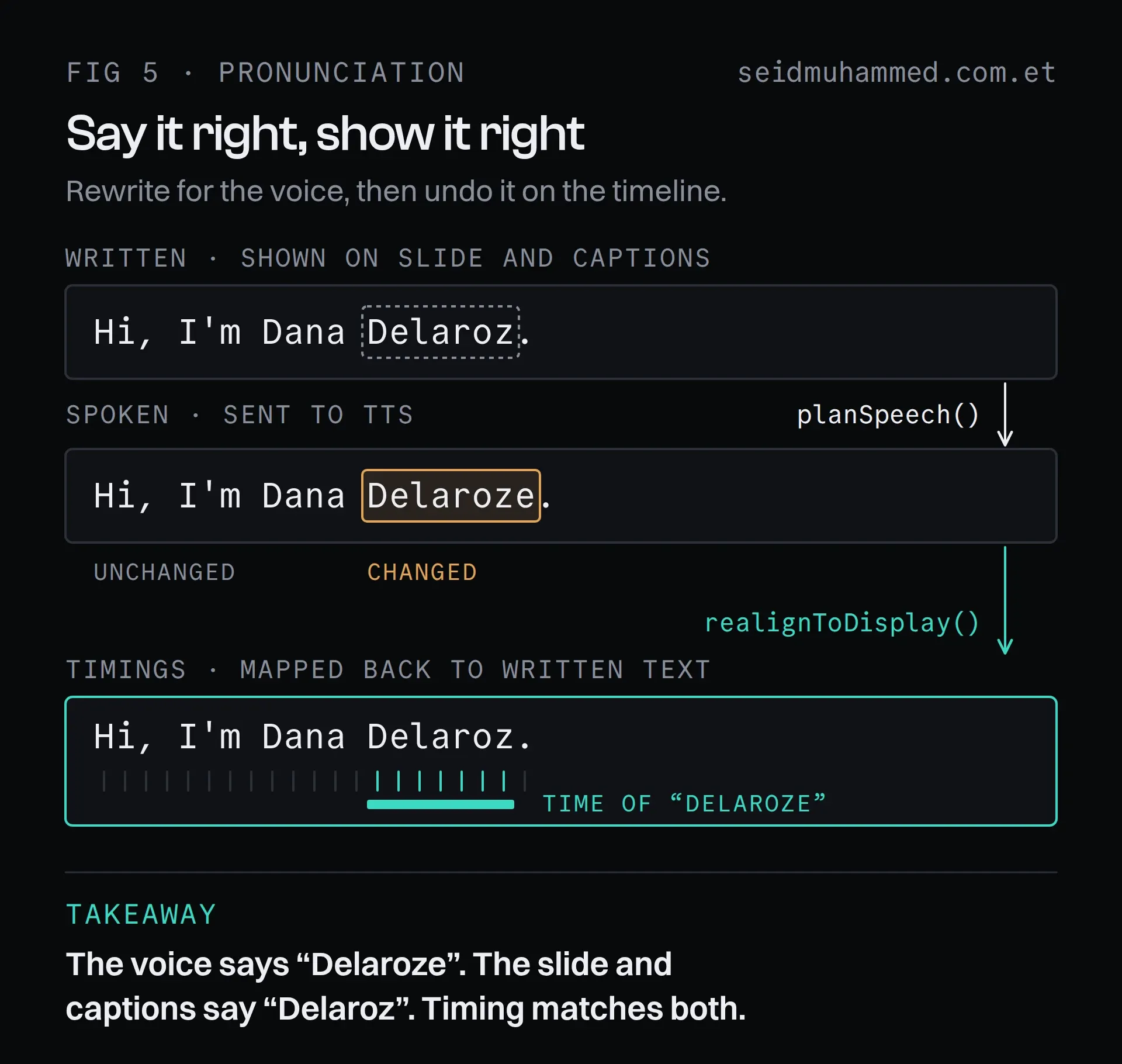
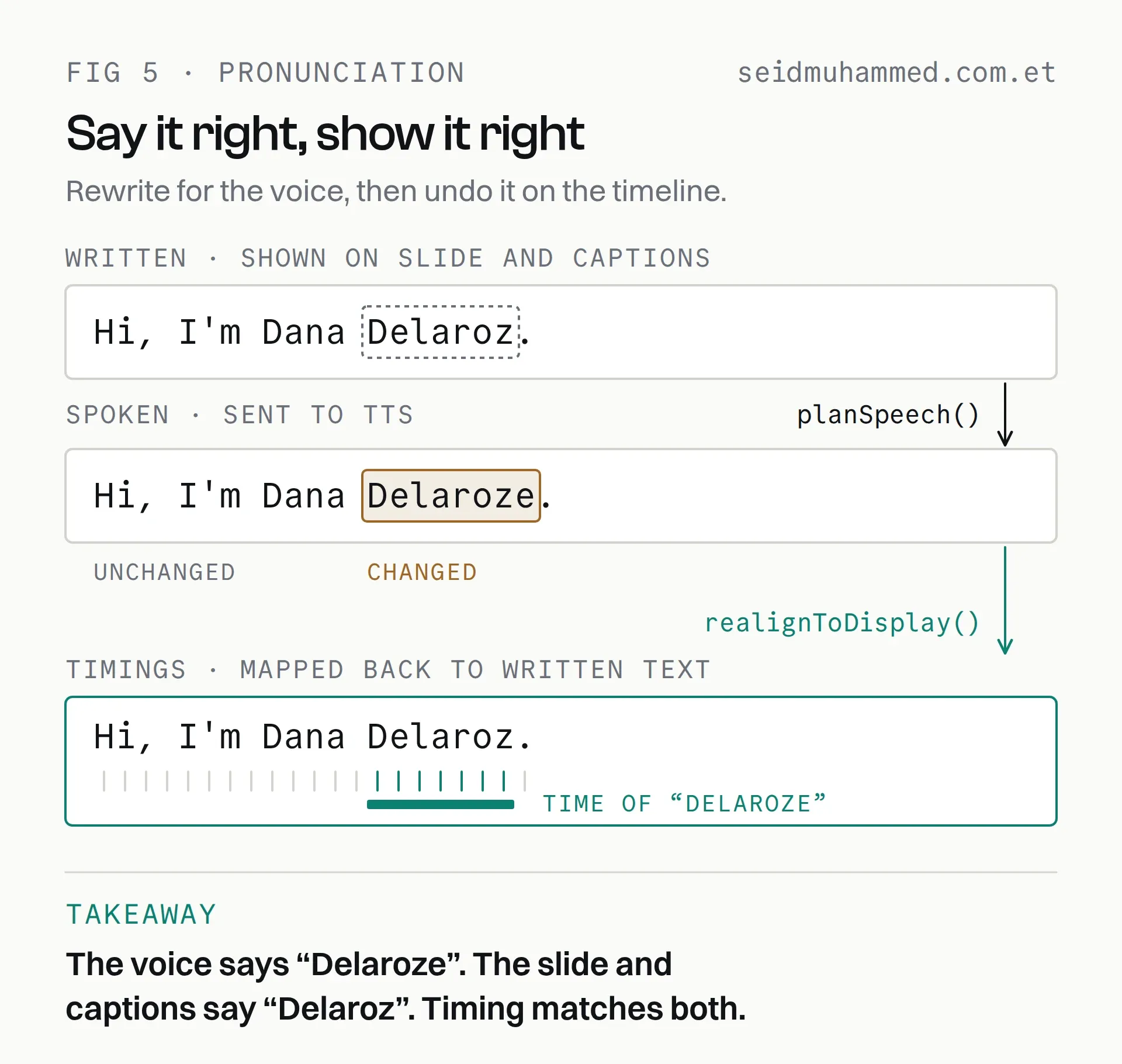
The rewritten span borrows its timing from the spoken word and spreads it across the written one, so the count-ups and captions stay aligned.
If the alignment ever stops matching the spoken text (an API change, say), realignToDisplay returns the original alignment untouched rather than producing plausible-but-wrong timings.
Degrade visibly, never silently.
Agents manage their own pronunciation list, and each entry has a Play button that speaks the respelling through the same endpoint and settings the pipeline uses. Finding the right spelling becomes a two-second loop instead of a render-and-listen cycle.
Protecting the credit balance
TTS bills per character, so audio is content-addressed. A slide's audio is identified by a hash of the spoken text plus a voice signature:
const plan = planSpeech(slide.narration, lexicon)
const hash = narrationHash(plan.spoken, voiceId, voiceSignature(tuning))
if (slide.narrationHash === hash && slide.audioKey) return // nothing to do
Some pleasant consequences fall out for free:
- Editing a slide's layout never re-bills anything.
- Editing one pronunciation re-stales exactly the slides containing that word.
- Changing the delivery pace re-stales everything, correctly, because the old audio genuinely is the wrong pace now.
And one deliberate subtlety: when voice tuning sits at its defaults, the signature collapses to the bare model id, the exact key used before tuning existed. Shipping the feature re-billed nothing.
When you extend a cache key, make the common case hash to its old value.
The editor
The pipeline was never the hard part. The editor was.
Click-to-edit on the slide. Not a form beside a preview: click the actual headline on the actual slide and type. This works generically across all eleven templates by matching the clicked DOM text back to the prop that produced it, then overlaying an input in the same computed typography, scaled from the 1920px composition down to display size. Dollar edits keep their cents twin in sync so the count-up stays correct.
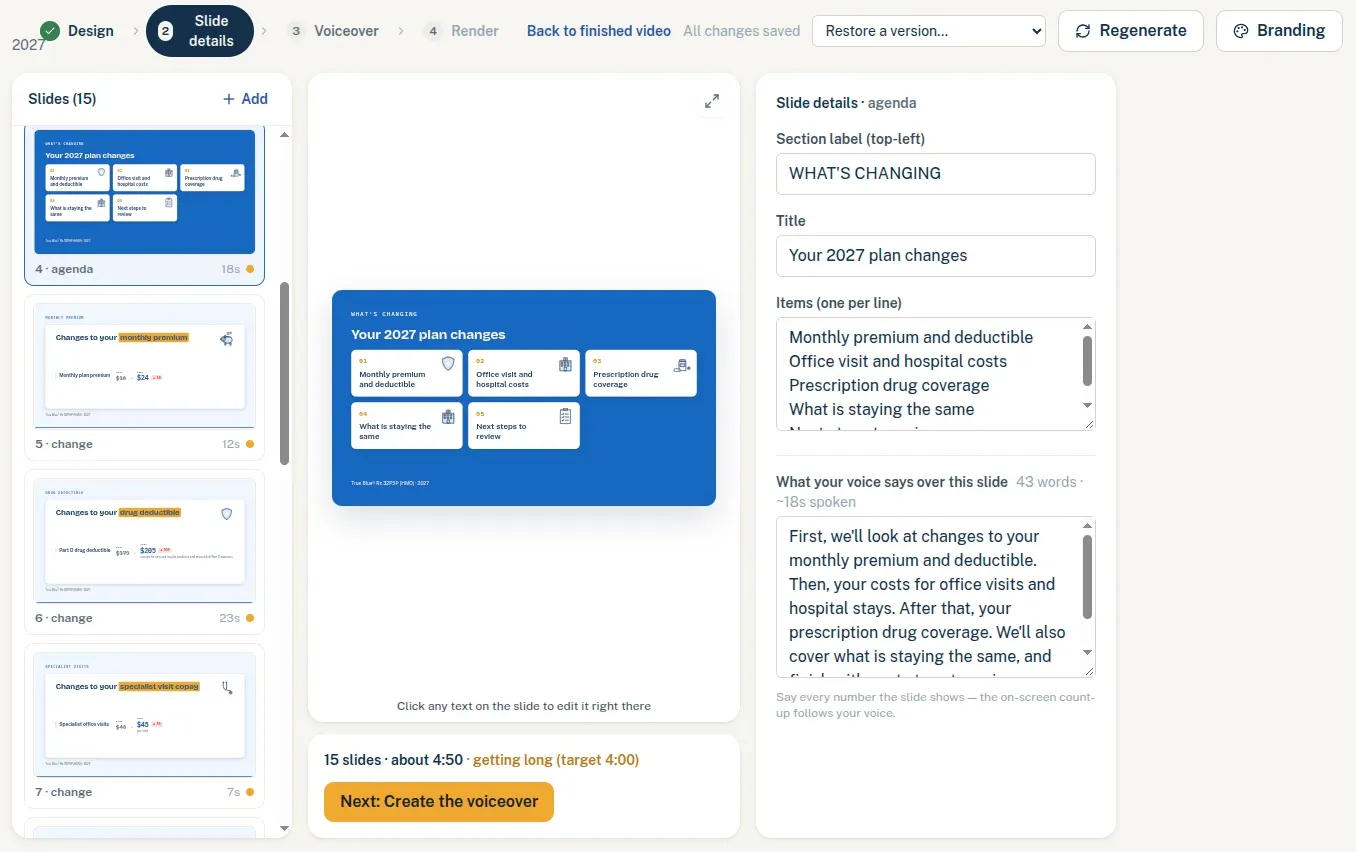
The narration panel counts words and spoken seconds as you type, and the footer warns when the whole deck is running past its target length.
Eight themes and three font presets. Every component reads colour through a context-aware hook rather than importing constants, so a theme change restyles the canvas, the filmstrip thumbnails and the render together. Themes carry a hero: 'dark' | 'light' flag. Feedback was that the default navy read "very dark", and the fix wasn't a lighter shade of the same idea but a genuine light-hero variant honoured by the slides, waveform, brand marks, caption chips and composition background.
A progress screen that tells the truth. Extraction takes minutes because of the rate-limit chunking above. Rather than a spinner, the worker reports real progress, "Reading pages 13–24 of 32…", against a four-step timeline that explains why each step costs what it costs. Honest waiting is much shorter than mysterious waiting.
The video that kept stopping
A user reported that finished videos wouldn't play. They'd stop partway.
The MP4 was fine. I downloaded the Lambda output and probed it: valid H.264, valid AAC, moov atom at byte 36 so it was streaming-ready, decoding cleanly end to end.
The bug was in the page. The ready screen polled the server every two seconds for render status, and every response minted a fresh presigned URL for the video. React saw a new src on the <video> element and remounted it. Every two seconds. Forever.
// A terminal status never changes again — and each poll would mint NEW presigned
// URLs, remounting the <video> src mid-playback. Stop polling entirely.
if (next.status === 'ready' || next.status === 'failed') {
  stop = true
  clearInterval(interval)
}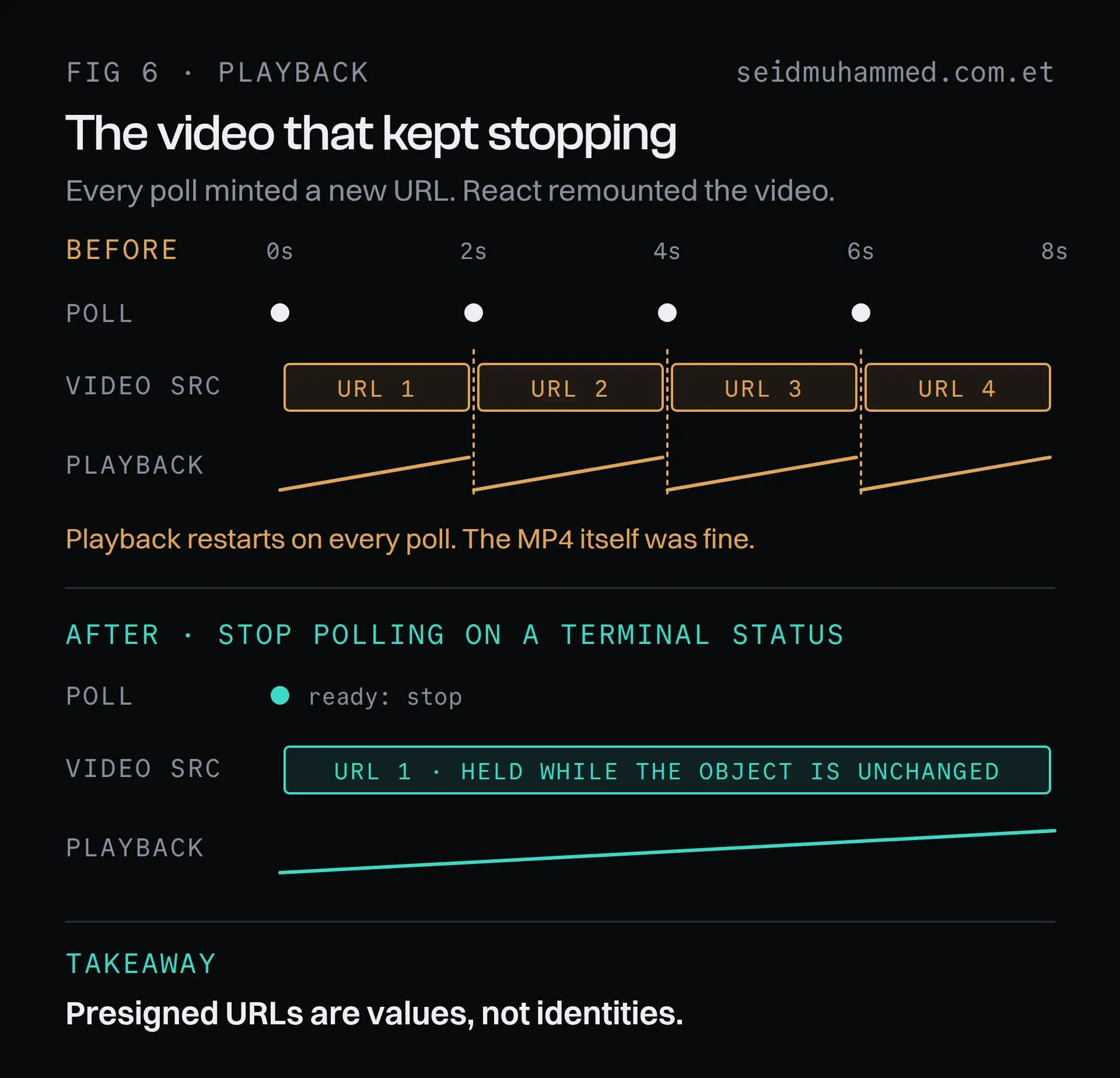
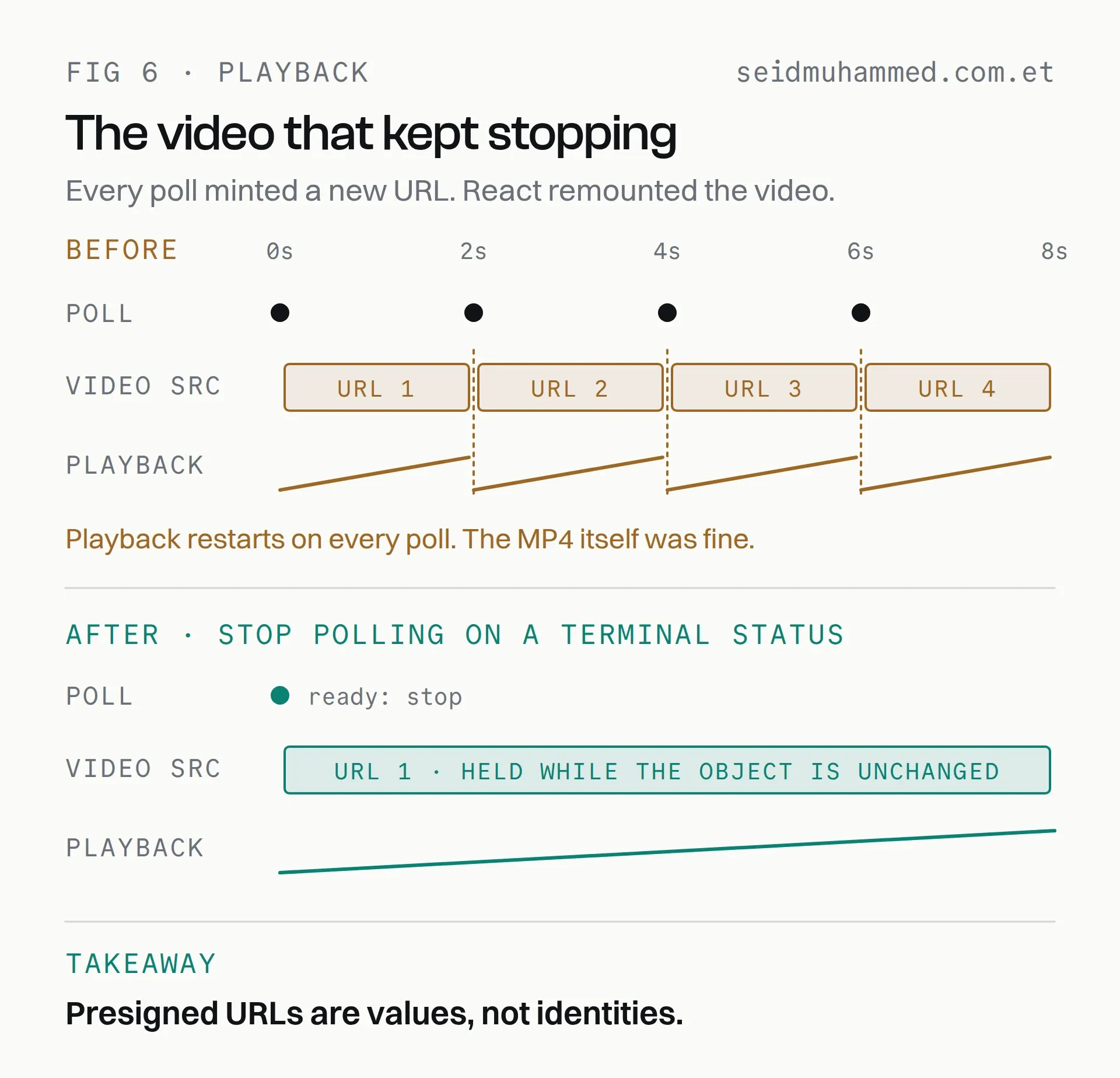
It looked like a media bug, so the first place to look was the file. The file was the one thing that was fine.
The same disease was in the editor: slide audio URLs and logo URLs churned on every poll, restarting audio and re-fetching images. Both now hold their first URL while the underlying object is unchanged.
Presigned URLs are values, not identities. If you put one in a render tree, freeze it.
Running it
Deployment is deliberately unfashionable: Docker Compose on a single EC2 instance, with Caddy terminating TLS and routing to containers by hostname. The box is shared with an unrelated application through an external Docker network with explicit aliases, and both use the same Postgres instance with separate databases and verify-full TLS.
Security basics, none of them clever:
- Argon2id password hashing (19 MB, t=2, p=1), database-backed sessions, HMAC-signed cookies
- Cloudflare Turnstile on login, verified fail-closed, with the sign-in button gated on a token
- Every media byte moves through presigned URLs; nothing streams through the application server
- Secrets live only in the server's environment,
.env.exampleis placeholder-only, and GitHub push protection has caught a real key twice
Eight migrations, all forward-only, all with defaults, so old and new code tolerate either order during a rolling restart.
Six lessons worth keeping
- One schema, three consumers. Deriving the renderer, the editor forms and the model's output schema from the same Zod definitions eliminated a whole class of bug by construction.
- Test the shape of the output, not the parts you remembered. The
oneOffailure sailed through a suite that checked everything I had thought of. - Rate limits are architecture, not error handling. "Retry on 429" cannot fix a request that will never fit. Chunking, merging and adaptive splitting are design decisions.
- Content-address anything you pay for. Hash the actual input (the spoken text, not the written text), and when you extend a cache key, make the common case hash to its old value.
- Presigned URLs are values, not identities. Re-minting one inside a render loop looks like a media bug and isn't.
- Degrade visibly. When the alignment doesn't match, return the original rather than inventing timings. When an asset is missing, name the asset rather than timing out.
Where it goes next
Parallel extraction once the account clears a higher rate tier. Phoneme-level pronunciation control, for stress patterns rather than just vowels. Batch rendering across a whole book of business, which the Lambda architecture already supports: a queue-depth question, not an engineering one.
But the thing worth stating plainly is what the system does not do. It doesn't decide what a plan covers. It doesn't send anything to a client. It doesn't put a number on screen that a human hasn't approved. It drafts, quickly and accurately, and then it gets out of the way.
FAQ
How does PlanReel turn a PDF into a narrated video?
Four idempotent jobs on one BullMQ queue. Extract pulls the plan's figures from the PDF with a strict JSON schema. Generate-script writes narration per slide from the reviewed data. Synthesize-slide speaks each slide in the agent's cloned voice through ElevenLabs. Render produces a 1080p MP4 and an SRT file, locally or on Remotion Lambda.
Why render on AWS Lambda instead of a server?
One small ARM box with two vCPUs renders two frames at a time, and a three-to-four minute video is around 7,000 frames. Remotion Lambda split a real render across 94 concurrent functions and finished in 23 seconds for $0.028, with no idle cost when nothing is rendering.
How do you stop the model inventing numbers?
The model fills a strict JSON schema generated from Zod. Every cost keeps the exact text the document printed for display and audit, plus integer cents used only for animation. The script prompt forbids any figure that isn't in the extracted data, and a person approves every slide and word before anything renders.
What do you do when a PDF is bigger than the rate limit?
Split it. A 32-page plan asked for 34,983 tokens against a 30,000 tokens-per-minute limit, which no retry can fix. PlanReel extracts twelve pages per call, around 18k tokens, runs the chunks one after another, halves any chunk that is still too large, and merges the results with page numbers kept absolute.
How do you make text-to-speech pronounce names correctly?
Rewrite the name for the voice only, then map the returned timings back onto the written text. The voice says "Delaroze" while the slide and captions keep "Delaroz", and the timing stays correct to the character. If the alignment ever stops matching, the original timings are kept instead of plausible wrong ones.
Why did finished videos keep stopping?
The ready screen polled every two seconds, and each response minted a new presigned URL for the video. React saw a new source and remounted the player each time. Stopping the poll on a terminal status, and holding a URL while the object is unchanged, fixed it.
That's the whole design. The model does the typing. The agent does the promising.
If you build anything where a model drafts and a person signs off, try one thing this week: walk the JSON Schema you send your model and fail the build on every keyword the provider rejects. If you want a pipeline like this built for your team, get in touch.