· 10 min read · Kubernetes · Benchmarks · Infrastructure
Kubernetes vs Single VM: Measured Deploy Time, p99 Latency and the Real Trade
The same service on one VM and on a three-node cluster, measured with wrk: deploy time, p99 under load, and what you pay for. A trade you can price, not a verdict.
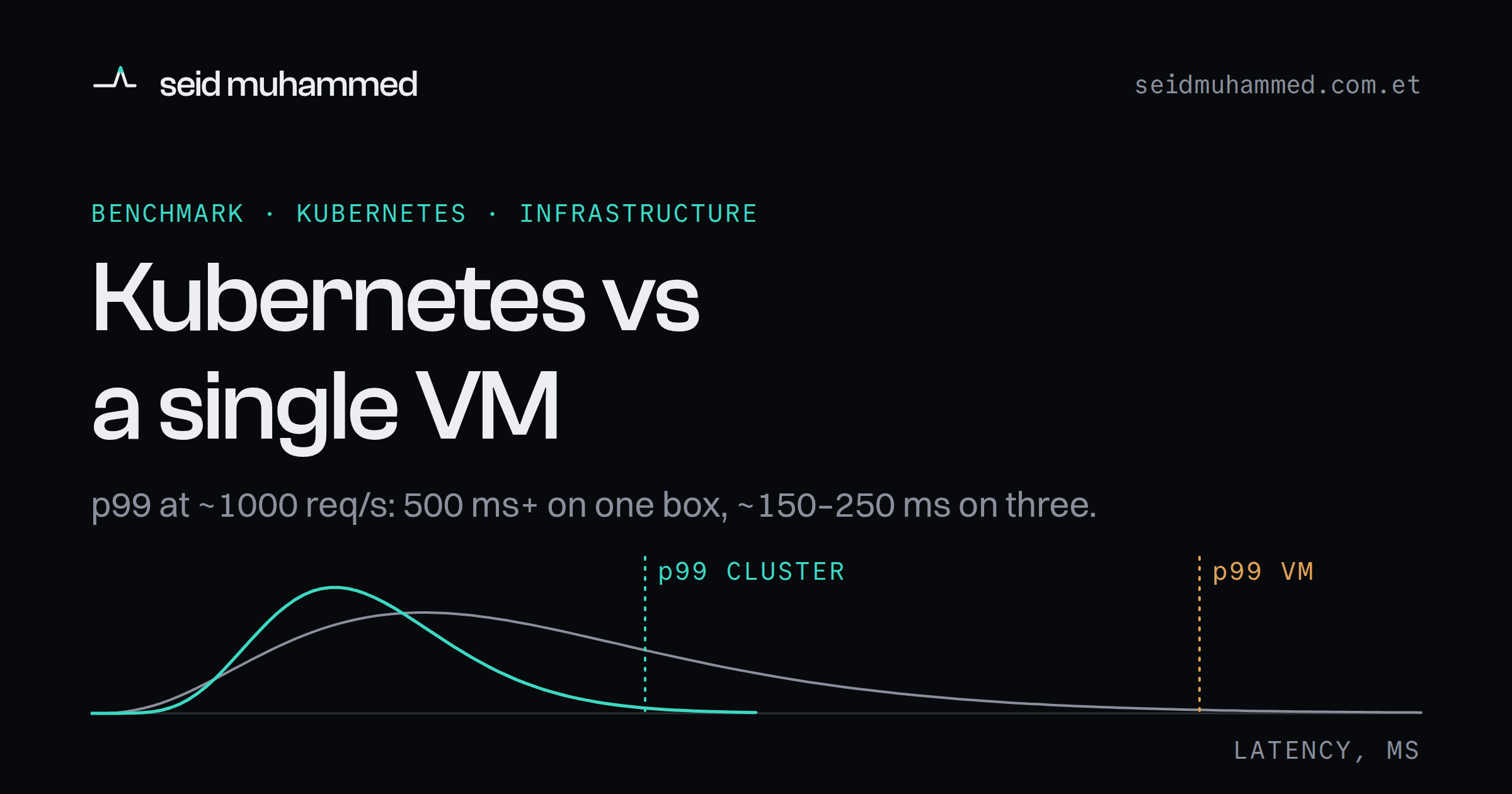
Right after I moved a service from one VM to Kubernetes, its latency went from roughly 20 ms to 100–200 ms. Same code, same container image, same instance size. The obvious conclusion is that Kubernetes is slow, and it is wrong.
The gap closed substantially once I tuned it. The argument about Kubernetes vs a single VM is usually conducted without numbers, which is why it never ends. So I deployed the same service twice, once on a single cloud VM and once on a three-node managed Kubernetes cluster, and measured the three things that actually decide it: how long a deploy takes, what the tail latency looks like under load, and what you pay for each month.
The result is not a verdict. It is a trade you can now price.
Steal this
If you only have ten minutes, do these before your next infrastructure meeting.
- Run the same load test against both setups and read the p99, not the average. The command I used is below. Thirty seconds is enough to see queueing.
- If latency got worse after a migration, check CPU limits for throttling first. Then check DNS resolution and connection pooling on outbound calls.
- Write down how often you deploy and what a 1–2 second gap would cost you. That number decides whether zero-downtime deploys are worth their wall-clock price.
- Price two VMs behind a load balancer before you price a cluster. It is the option most comparisons skip, including, as you will see, this one.
Who this is not for: teams already running dozens of services on a platform team's cluster. You made this decision years ago, for reasons this benchmark does not touch.
What the measurement changed
Without numbers, this argument is two slogans. One side says resilience. The other says simplicity. Neither side brings a p99.
Putting numbers on it changed three things about how I read the question. First, the deploy comparison stopped being "fast vs slow" and became "downtime vs wall-clock time", which is a trade with an exchange rate. Second, the latency comparison only made sense at the tail, where the two setups genuinely diverge. Third, a bad number after a migration is a configuration bug until proven otherwise.
Assume configuration before you assume the platform.
The results in one table
Everything this benchmark measured, in one place. The middle column is the option the post argues for in the cost section but did not benchmark, so its cells say so rather than guess.
| Single VM | 2 VMs + load balancer | 3-node Kubernetes |
|---|---|---|---|
Deploy time | 5–10 s | not measured | 30–60 s |
Downtime during deploy | usually 1–2 s | not measured | none |
Latency at low load, right after migrating | ~20 ms | not measured | 100–200 ms before tuning |
Average latency at ~1000 req/s | ~200 ms | not measured | not recorded |
p99 latency at ~1000 req/s | 500 ms and above | not measured | ~150–250 ms |
Extreme spikes | more | not measured | markedly fewer |
What you pay for each month | 1 VM | 2 VMs + a load balancer | 3 VMs + a managed control-plane fee |
Ops surface | smallest | small | largest |
Published June 2024.
Setup
The same lightweight HTTP API, the same container image, the same instance size in both environments. Nothing tuned for the benchmark, because a benchmark that only holds on ideal hardware tells you nothing about a Tuesday.
Load generated with wrk:
wrk -t12 -c400 -d30s http://service-urlTwelve threads, four hundred connections, thirty seconds. Enough to push both setups past comfortable and into the region where queueing behaviour shows up.
Kubernetes configuration:
- One replica per node, three replicas total
- Default rolling update strategy, so zero downtime is the expected behaviour
- Readiness probes enabled, so pods take traffic only after passing health checks
Deploy time on Kubernetes was measured from kubectl rollout status timestamps. On the VM it was measured from the container restart to the service answering again. Cost was taken from list pricing for the VMs plus the managed control-plane fee.
Deploy time
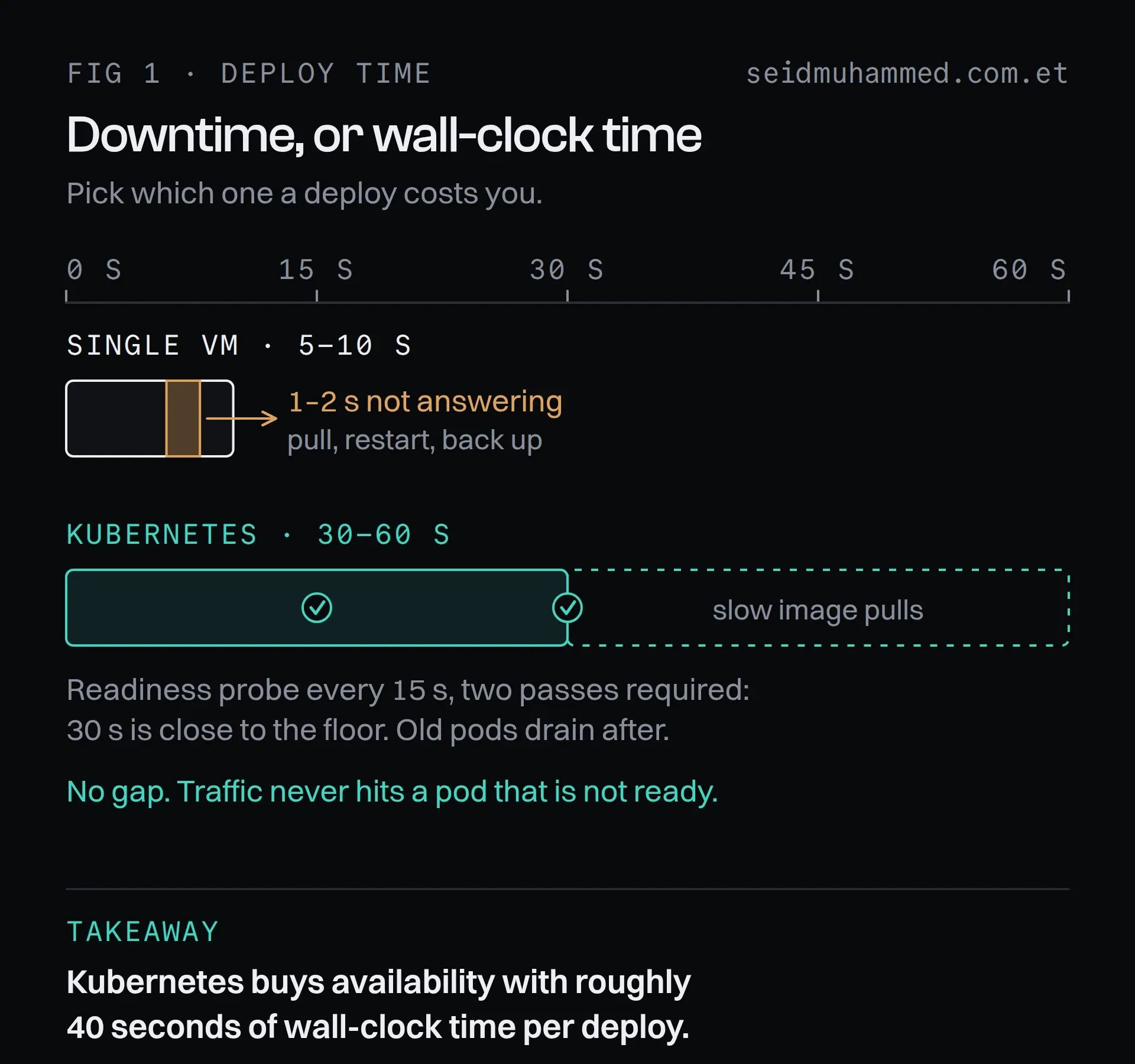
The VM finishes first and still loses the checkout request that arrives during its restart.
Single VM: 5–10 seconds, with a brief interruption.
Pull the image, restart the container, done. There is a window, usually a second or two, where the service is not answering. For a background worker nobody notices. For a checkout endpoint, somebody does.
Kubernetes: 30–60 seconds, with no interruption.
The spread is not overhead for its own sake. Each node pulls the new image, and each new pod has to pass readiness checks before the old one is drained. With a 15-second probe interval and two successful checks required, 30 seconds is close to the floor. Slow image pulls push it to 60.
So the honest framing is not "Kubernetes deploys are slow." It is that you are buying continuous availability with wall-clock time, and the exchange rate is roughly 40 seconds per deploy. If you deploy ten times a day and any of those deploys would otherwise drop requests, that is an obviously good trade. If you deploy weekly at 2am, you are paying for insurance you do not need.
Kubernetes buys availability at roughly 40 seconds per deploy. Decide whether you are buying.
Tail latency
This is where the two setups genuinely diverge, and where averages actively mislead.
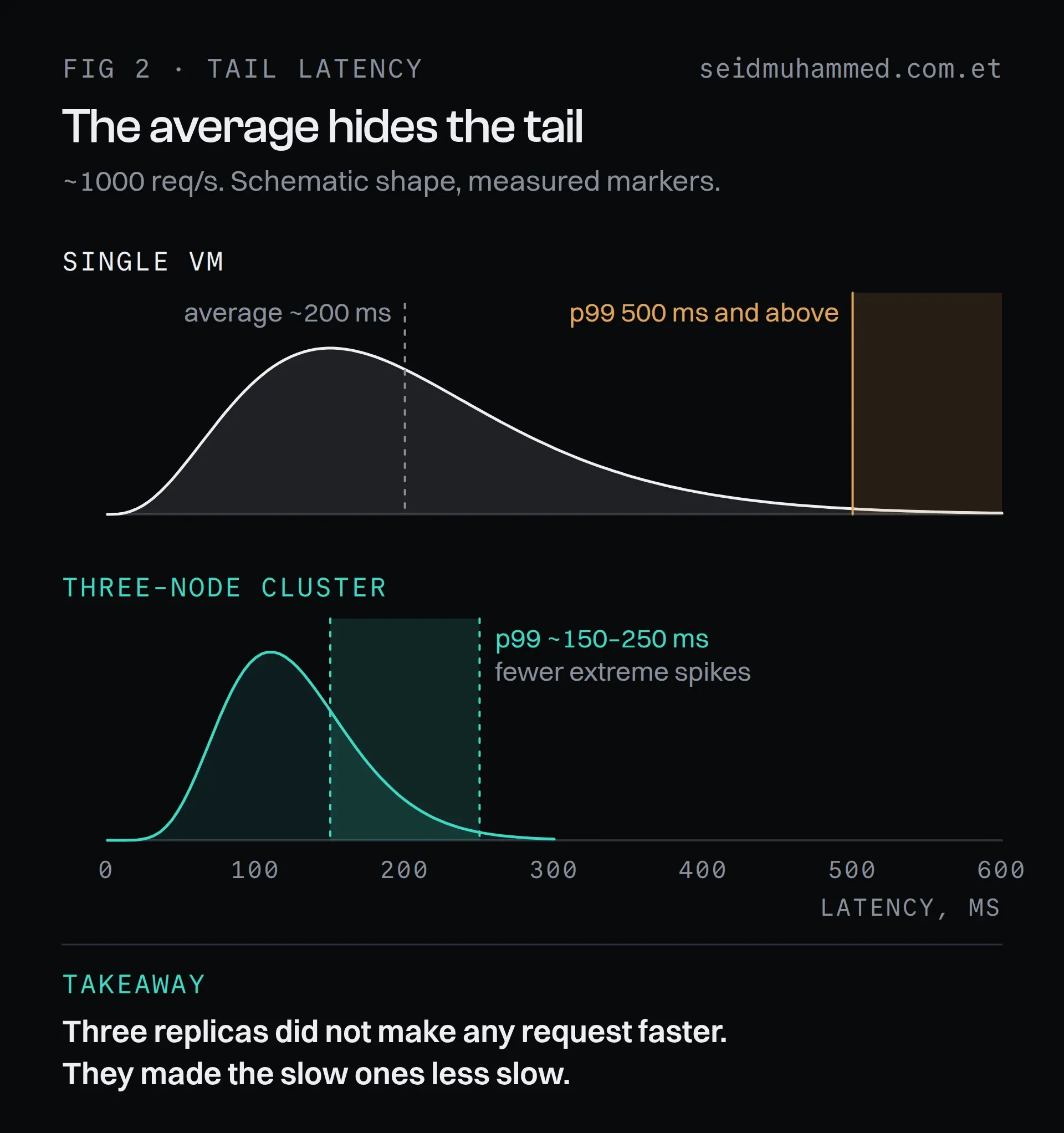
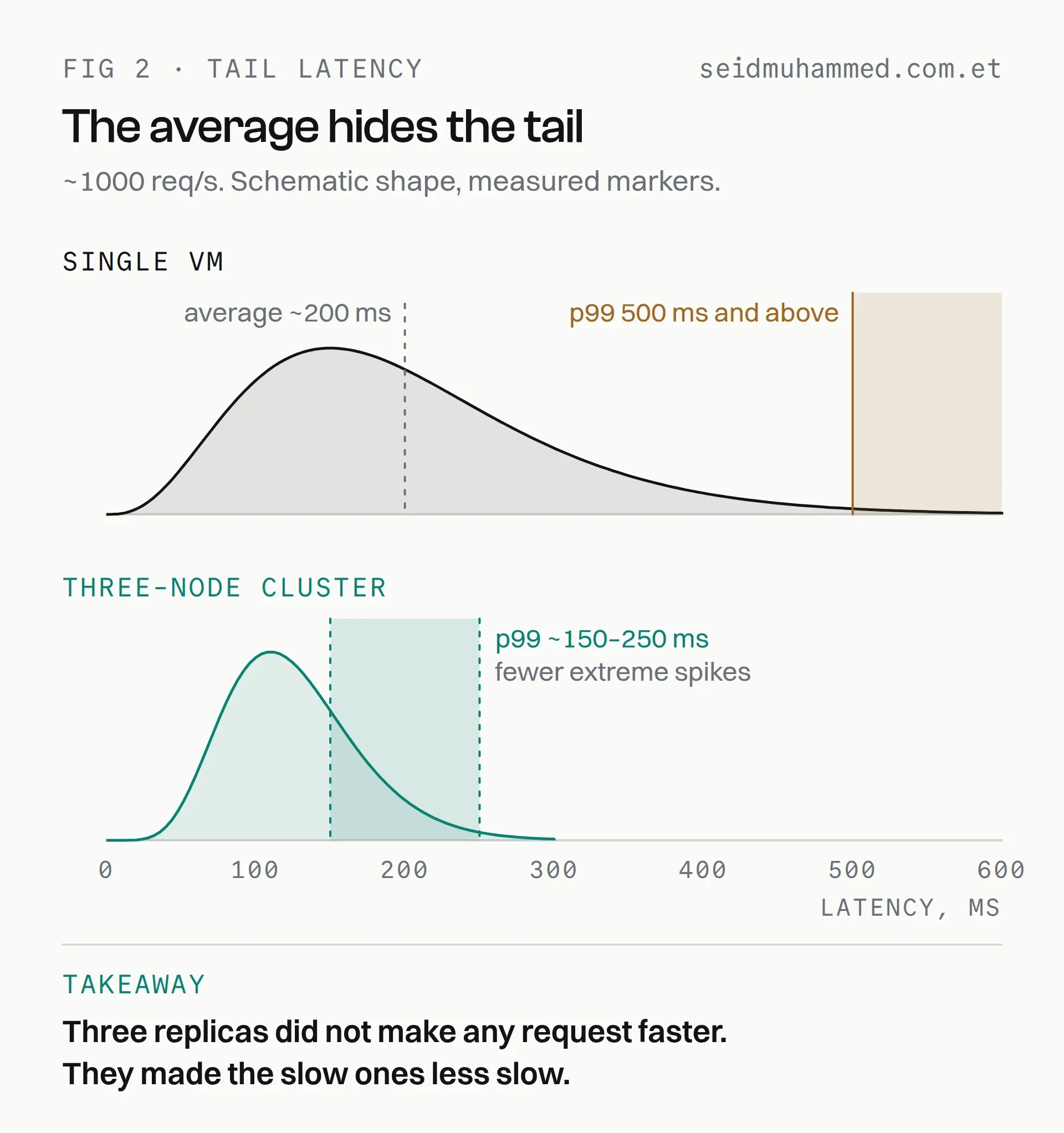
The curves are schematic. The markers are the measured figures, and the gap between them is the whole argument.
Single VM under sustained load (~1000 req/s):
- Average latency: ~200 ms
- p99 latency: 500 ms and above
The average looks survivable. The p99 does not. That gap is the signature of resource saturation: one machine, one queue, and requests that arrive while it is busy simply wait. Variance climbs with utilisation, and the requests at the back of the queue are the ones your users complain about. The same queueing arithmetic shows up inside a single Node.js process too, which I wrote about in how naive async/await chains stall the event loop.
Three-node cluster under the same load:
- p99 latency: ~150–250 ms
- Markedly fewer extreme spikes
Nothing clever is happening here. Three replicas mean each one handles roughly a third of the traffic, sits at a lower utilisation, and therefore queues less. You did not make any single request faster. You made the slow ones less slow, which is usually what you were actually being asked for.
The average was never the thing that was broken.
The overhead nobody mentions until it bites
Kubernetes is not free at the request level. There is an extra network hop and a service proxy layer between the client and your process, and at low load the VM can simply be faster. I saw roughly 20 ms against 100–200 ms immediately after migrating.
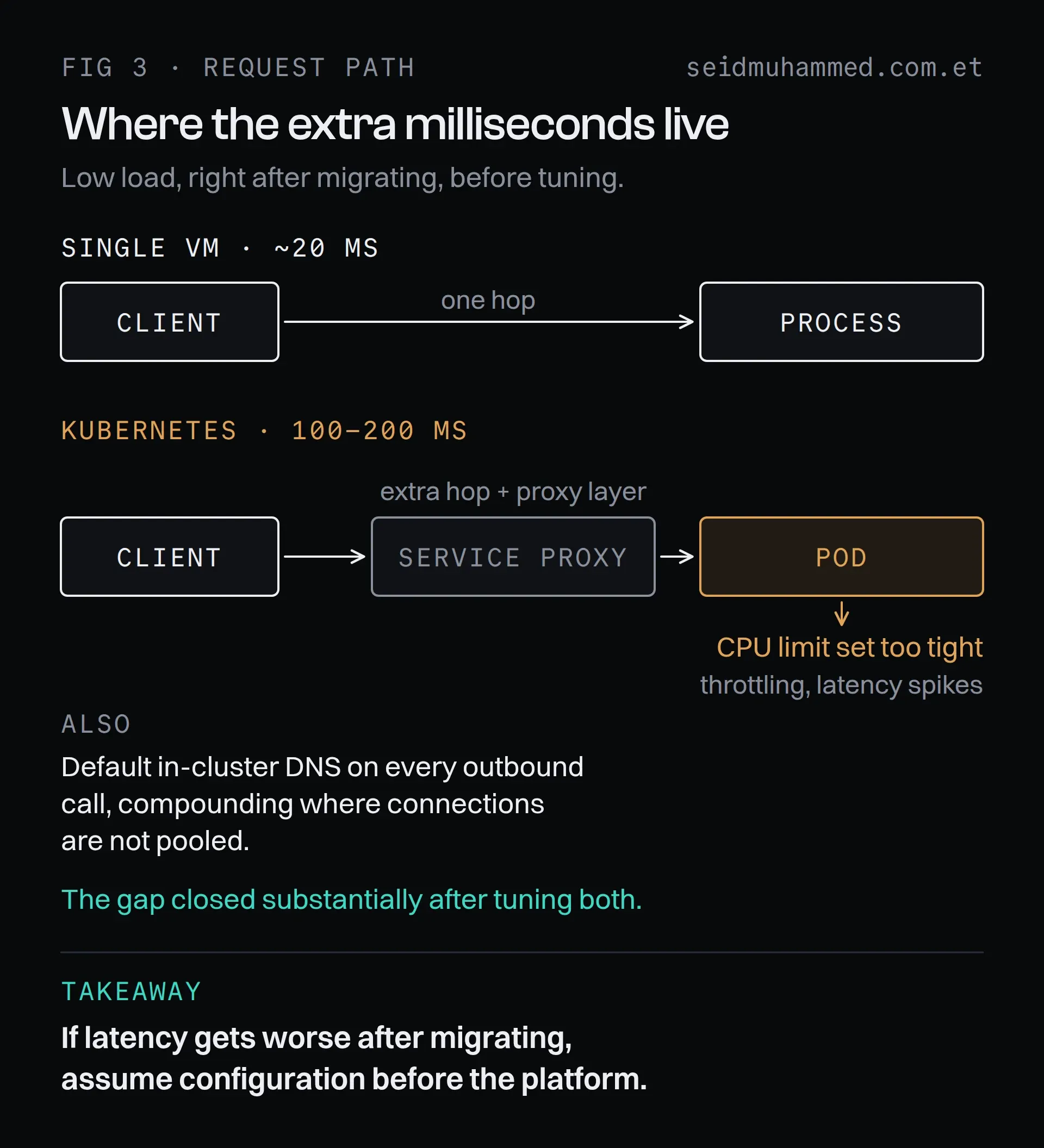
The extra hop is real. How much of the gap was the hop and how much was settings was not measured separately.
That gap closed substantially with tuning. The two things that mattered most:
Resource limits. A CPU limit set too tight causes throttling, and throttled containers produce exactly the latency spikes you moved to Kubernetes to avoid. This is the single most common self-inflicted wound in a fresh cluster: the platform gets blamed for a number the operator configured.
DNS and connection reuse. Default DNS resolution inside a cluster can add milliseconds to every outbound call, and it compounds anywhere connections are not being pooled.
If you migrate and latency gets worse, assume configuration before you assume the platform. It usually is.
Your latency regression is probably configuration: CPU limits first, then DNS.
Cost
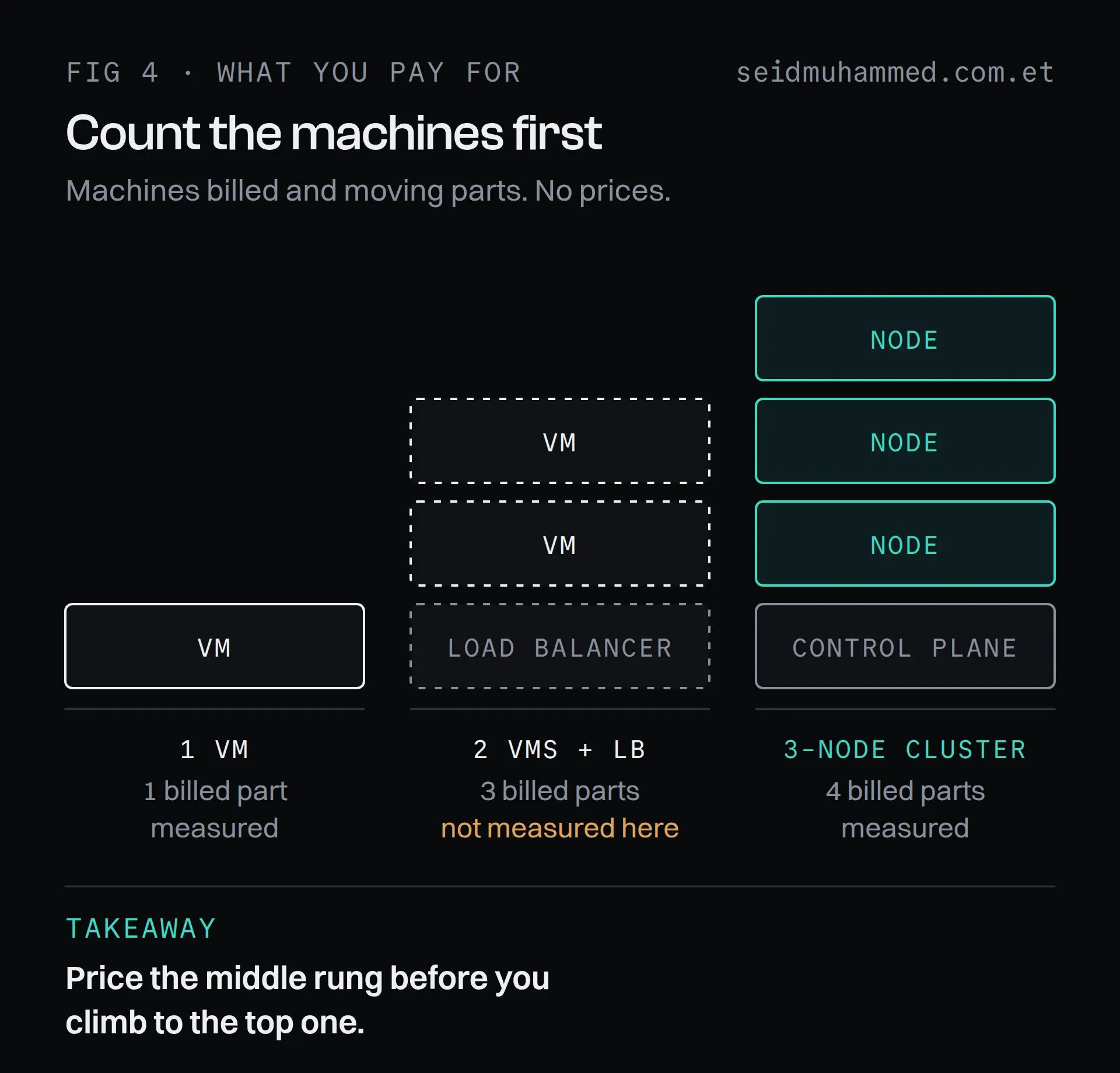
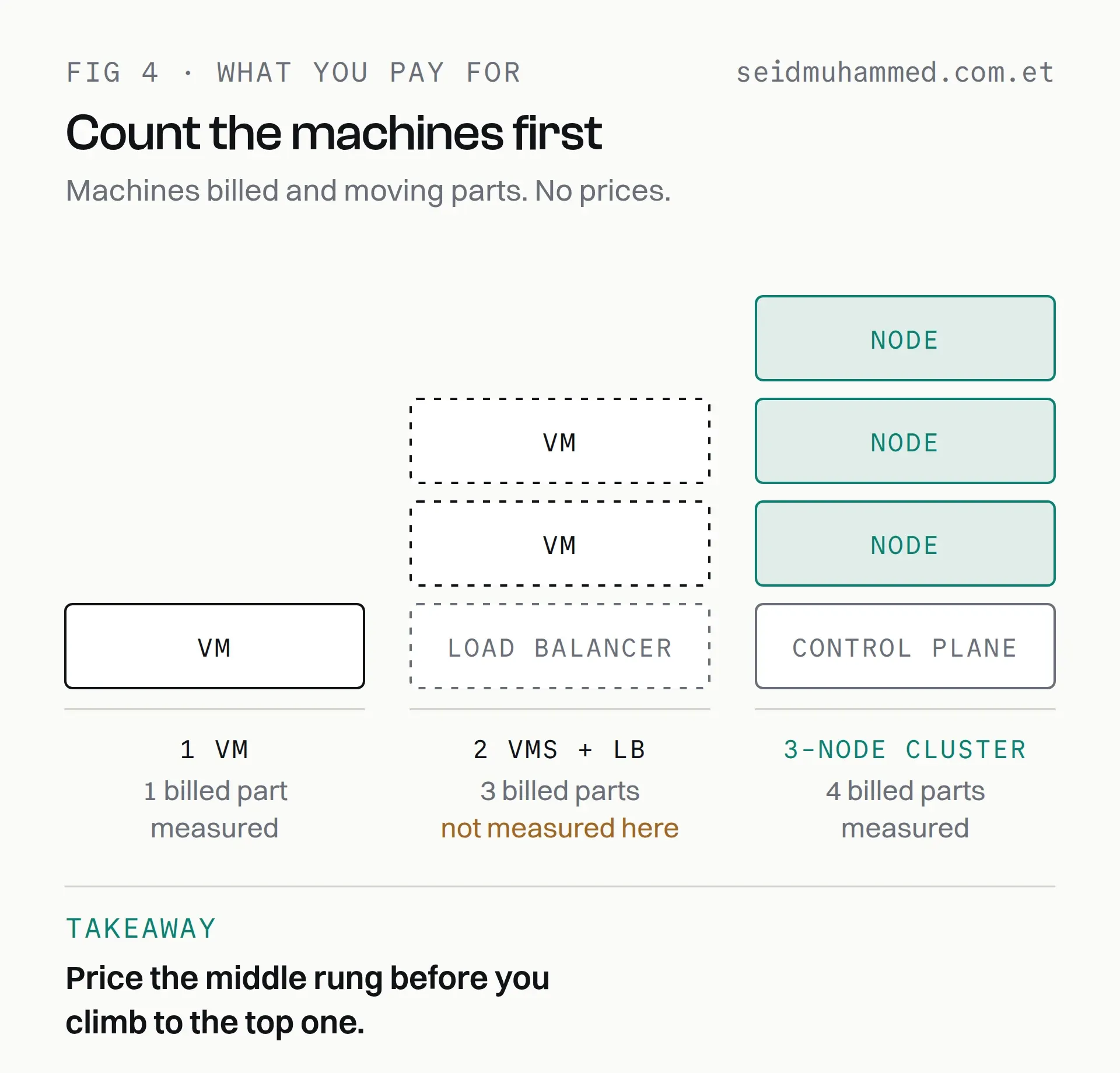
No prices on purpose. Count what you are billed for first, then look up your own provider's rates.
Three VMs instead of one, plus a managed control-plane fee, is the base. It is a real multiple, not a rounding error, and for a service that fits comfortably on one machine it is difficult to justify on performance grounds alone.
The comparison people forget to make is against the alternative spend. Two VMs behind a load balancer gets you most of the availability story for less money and considerably less operational surface. I didn't benchmark it either, which is exactly the point: it is the option comparisons skip.
Kubernetes starts paying for itself when you have enough services that per-service deployment, scaling and rollout logic would otherwise be duplicated by hand. That is a headcount argument as much as an infrastructure one.
Kubernetes is a headcount decision wearing an infrastructure costume.
How I would decide
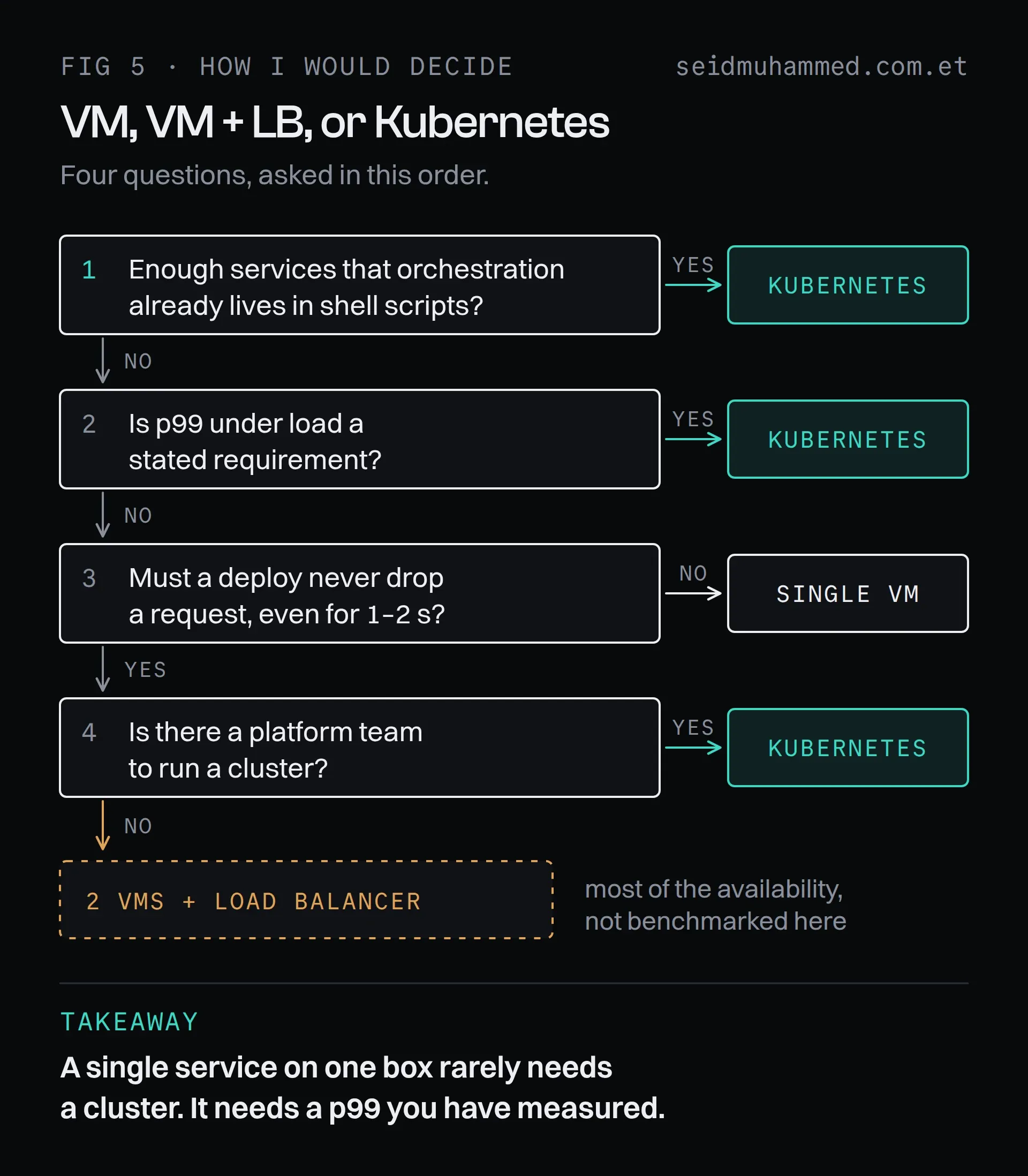
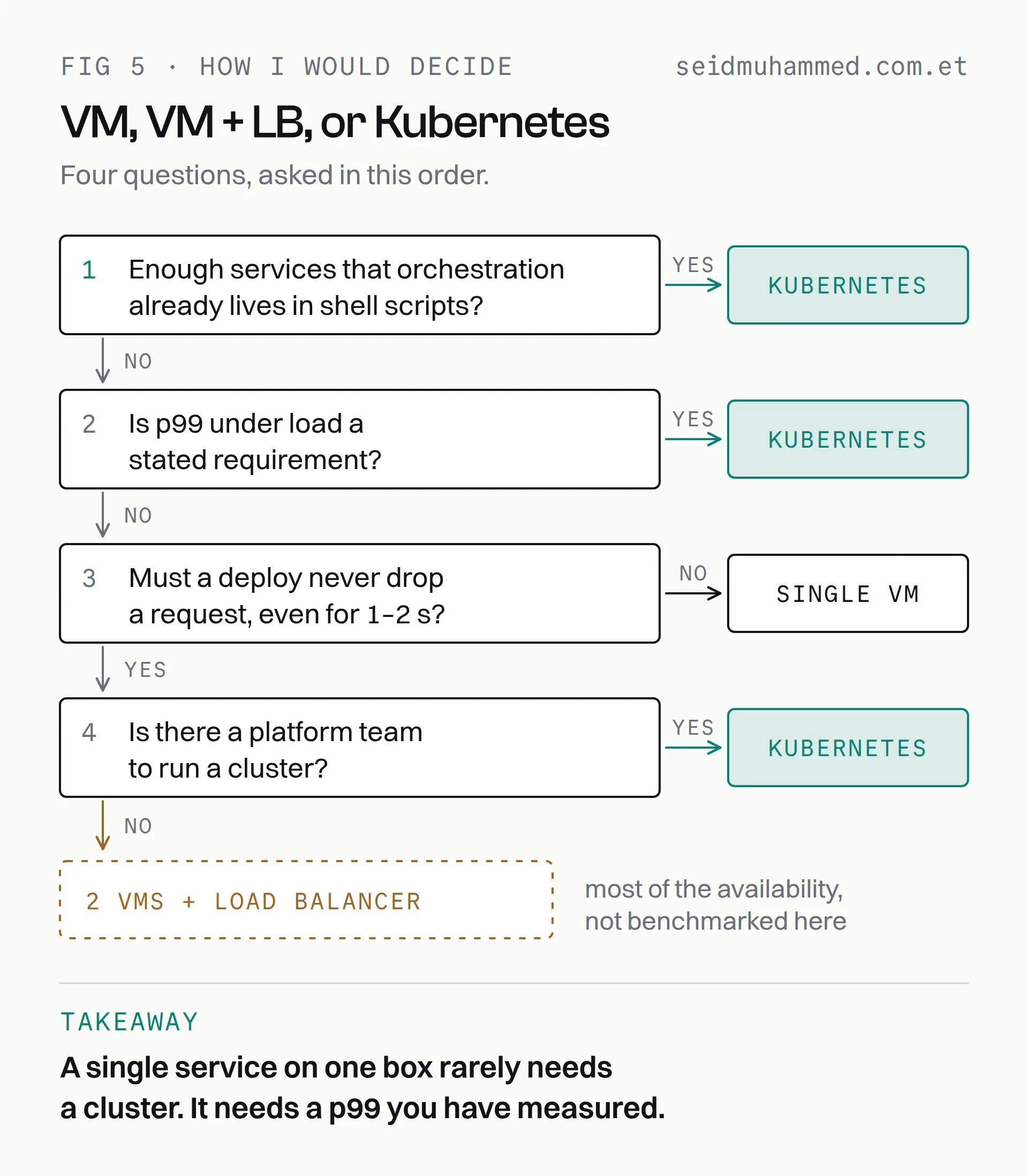
Four questions, in order.
Take the single VM when the service fits on one box, brief downtime during deploys is acceptable, and there is no platform team. It is faster at low load, it costs a third as much, and there is far less that can be misconfigured.
Take Kubernetes when tail latency under load is a stated requirement, or when you are running enough services that orchestration is already happening informally in shell scripts. Take it too when deploys cannot drop requests and there is a platform team to run it. Budget for the tuning pass. The out-of-the-box numbers are not the numbers you will end up with.
If deploys cannot drop requests but there is no one to run a cluster, price two VMs and a load balancer before anything else.
What I would not do is take Kubernetes for a single service and then explain the latency regression as unavoidable overhead. Measure it, set the limits properly, and check the p99 rather than the average.
FAQ
Is Kubernetes faster than a single VM?
Not per request. At low load the VM was faster in this benchmark, roughly 20 ms against 100–200 ms right after migrating. Kubernetes adds a real network hop and a proxy layer, but how much of that gap was the hop and how much was configuration was not measured separately. Under sustained load the three-node cluster had the better tail, with a p99 of about 150–250 ms against 500 ms and above, because each replica queued less.
How long does a Kubernetes rolling deploy take?
In this setup, 30–60 seconds against 5–10 seconds on a single VM. With a 15-second readiness probe interval and two successful checks required, 30 seconds is close to the floor, and slow image pulls push it towards 60. In exchange there was no interruption, where the VM stopped answering for a second or two.
Why did latency get worse after moving to Kubernetes?
Usually configuration. A CPU limit set too tight causes throttling, and default in-cluster DNS resolution adds time to outbound calls, especially where connections are not pooled. In this benchmark the gap closed substantially once both were tuned.
Is Kubernetes worth it for a single service?
Rarely. For a service that fits on one machine you pay for three VMs plus a control-plane fee, and you take on more that can be misconfigured. If you need availability during deploys, two VMs behind a load balancer is worth pricing first.
When does Kubernetes pay for itself?
When you run enough services that deployment, scaling and rollout logic would otherwise be duplicated by hand, when tail latency under load is a stated requirement, or when deploys must never drop requests and a platform team can run the cluster. It is a headcount decision as much as an infrastructure one.
Measure yours this week
Before your next migration conversation, run the wrk command above against the service you are arguing about and write down the p99. Then do it again after any change. It takes thirty seconds and gives the debate a number.
Argue about the p99, not the platform.
If you want this measured and tuned for your own stack, get in touch. The work I have shipped is on my projects page.